Manage Online Reviews Without Losing Control Using Human Checked AI

Manage online reviews by centralizing monitoring across every platform, replying fast and humanly, soliciting fresh reviews ethically, and routing feedback patterns into real operational fixes. Use Google Business Profile as your baseline monitoring point and a dedicated tool like ReviewSync for consolidated response and analytics. A realistic target: respond to negative reviews promptly and positive ones within a couple of days. Businesses that hit that mark consistently see steadier ratings and fewer unresolved complaints piling up in public view.
TL;DR:
- Respond promptly to negative reviews within 24 hours and positive reviews within 48 hours to foster trust and prevent unresolved complaints.
- Centralize review monitoring across Google, major review sites, app stores, and social platforms using verified profiles and automated alerts.
- Use a human-in-the-loop system with AI drafting responses to ensure consistency, tone, and accuracy in replies across multiple locations.
- Identify and flag fake reviews by pattern recognition, document evidence, and avoid offering incentives for reviews to remain compliant with platform policies.
- Track review volume, trends, and sentiment regularly to turn feedback into operational improvements and resolve recurring issues effectively.
Table of Contents
- Centralize Review Monitoring Across Every Channel
- How Should You Respond to Customer Reviews?
- When and How Should You Ask for Reviews?
- Turning Review Data Into Operational Fixes
- Scaling Review Management With AI, Without Losing the Human Voice
- How Do You Handle Fake or Policy-Violating Reviews?
- Your 30/60/90-Day Review Management Checklist
- Why Human Oversight Still Decides Whether This Works
- Let AISEO Tech Run Your Review Playbook
- Sources
Centralize Review Monitoring Across Every Channel
You cannot respond to a review you never saw. That is the failure mode that quietly damages more businesses than any single bad review ever could. A one star complaint sitting unanswered for three weeks tells every future customer that nobody is home.
Start with the channels that carry the most weight for your business type:
- Google Business Profile — the default destination for local search and Maps traffic; most customers check it first.
- Major review sites (Yelp, TripAdvisor, industry-specific platforms like G2 or Healthgrades) — smaller volume, but often higher-intent readers.
- App stores (Apple App Store, Google Play) — critical if you run a mobile product, since ratings directly affect install conversion.
- Social platforms (Facebook reviews, X mentions, Instagram comments) — reviews here move fast and get seen by friends and followers, not just prospects.
Getting access to Google reviews starts with verifying your Google Business Profile. Once verified, you can read every review, reply publicly, edit a reply if you made a mistake, or delete one that no longer fits, all from the same dashboard. Set up review alerts through the profile’s notification settings so new reviews land in your inbox the moment they post. Skipping verification is the single most common reason small businesses miss reviews for weeks.
For a single view across platforms, you have three realistic options. In-house aggregation works if you have one or two channels and someone checking daily. Lightweight review-notification apps handle small operations that just need alerts without deep analytics. A centralized dashboard, the category ReviewSync belongs to, fits businesses managing multiple locations or channels where manual checking becomes a full-time job nobody has time for. Sprinklr’s review-management framework makes the same point: a central view prevents urgent issues from getting buried under routine five-star notifications.
Once everything funnels into one place, triage becomes the real skill. Not every review deserves the same urgency. Prioritize by three factors:
- Severity — a review alleging safety issues or fraud outranks a complaint about slow shipping.
- Sentiment — clearly angry or public-facing complaints need faster attention than neutral, low-emotion feedback.
- Influence — a reviewer with a large following or a review ranking high in search results carries more reputational weight than one buried on page three.
Build this triage into a simple daily habit, not a monthly audit. Reviews lose their urgency value fast; a perfect response three weeks late reads as an afterthought.
If the immediate problem is speed of detection rather than response, start with monitor customer reviews — the alerting and routing setup that makes sure no review sits unseen.
How Should You Respond to Customer Reviews?
Every reply, positive or negative, should follow a consistent shape: acknowledge the specific issue, empathize without being saccharine, explain what happens next, offer a private channel for details, and invite the reviewer to update their post once resolved. Skipping the “invite an update” step is the most common miss. Customers who feel heard and later see their concern addressed will often edit a one-star review into a four-star one, and that revision is visible to everyone who reads it after.
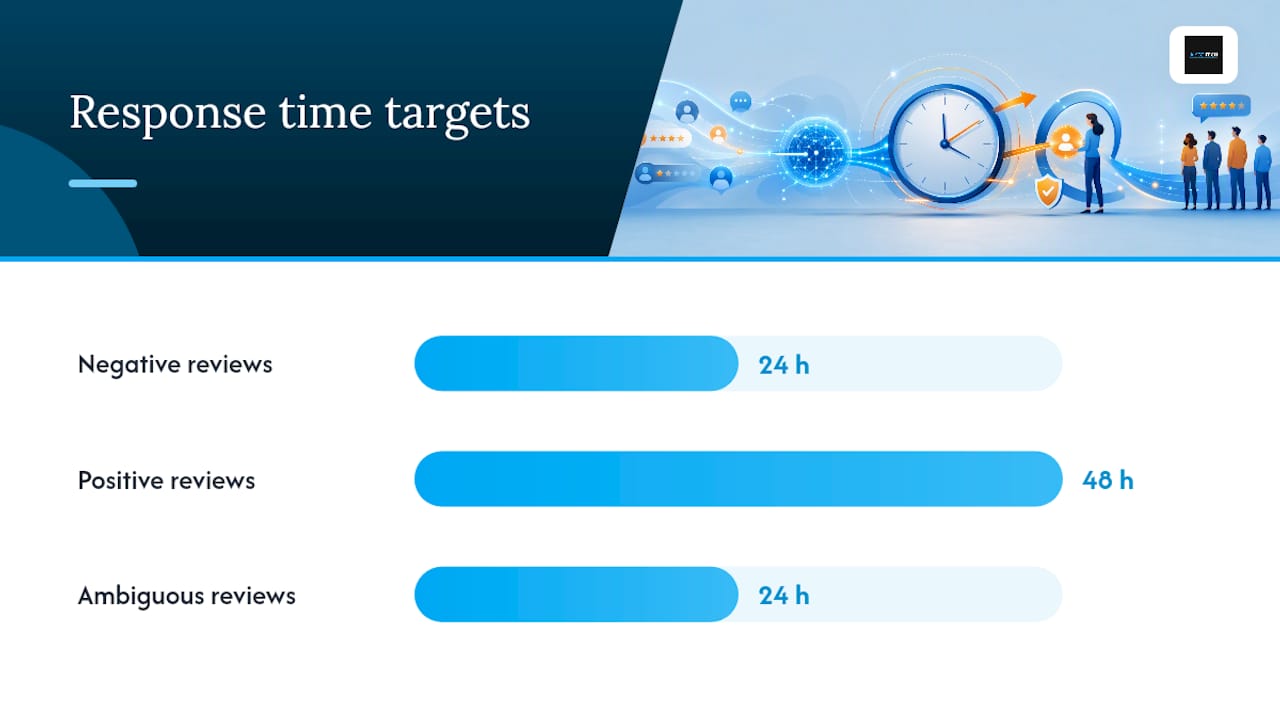
Speed matters more for negative reviews than positive ones, but both need a floor. A reasonable target:
- Negative reviews: respond within 24 hours. Silence reads as indifference, and US Chamber guidance notes that a calm, professional reply to a bad review can actually build more trust with future readers than a stream of five-star praise.
- Positive reviews: respond within 48 hours. A quick, specific thank-you (not a copy-paste “Thanks for your review!”) reinforces the relationship and shows other readers you engage across the board, not just when there’s a fire.
- Ambiguous or mixed reviews: treat these like negative ones. If a customer says “food was great, service was slow,” the service comment is the one that needs direct acknowledgment.
Templates help you move fast, but a template posted verbatim is instantly recognizable and it cheapens the response. A workable pattern: draft with AI for structure and tone, then a human editor rewrites the specific details, the reviewer’s actual complaint, the store location, the order number, before it goes live. That one edit pass is what separates a reply that feels personal from one that feels automated.
Pro Tip: Never negotiate refunds, discounts, or specific compensation in a public reply. Say “please reach out to us directly at [contact]” and finish the resolution privately. Then, once it’s settled, post a brief public follow-up: “Update: we connected with the customer and resolved this on [date].” That second note is what future customers actually read.
Move to private channels the moment a complaint involves personal details, payment issues, or anything that requires back-and-forth. The public reply’s only job at that point is to show you responded quickly and took it seriously.
For Google specifically, use the templates and escalation rules in our guide to respond to Google reviews rather than improvising a reply under pressure.
When and How Should You Ask for Reviews?
The best moment to ask is right after a customer experiences the win, not weeks later when the feeling has faded. Three reliable triggers work across most industries:
- Immediately after purchase, for products where satisfaction is obvious right away (a meal, a haircut, a delivered package).
- After service completion, for longer engagements like consulting, repairs, or installations, where the value only becomes clear once the job is done.
- Right after resolving a complaint, since a customer whose problem you just fixed is often your most persuadable reviewer.
Mechanically, keep it simple: a direct review link texted or emailed within a day of the trigger event, a QR code on a receipt or table tent for in-person businesses, or a verbal ask at checkout followed by a link. Business lists encouraging reviews as one of the highest-leverage habits a business can build, precisely because most businesses never ask at all.
Stay inside platform policy while you do it. Never offer a discount or incentive in exchange for a review, and never write or edit a review on a customer’s behalf. Google and most major platforms treat both as violations that can get reviews removed or your profile flagged. Keep the ask short: one link, one sentence, no pressure. An online retailer might trigger an SMS 24 hours after delivery confirmation; a local clinic might hand a printed QR code at checkout. Same principle, different mechanics.
The asking system behind that section — timing, one-tap links, QR codes and one polite follow-up — is set out in full in our guide to increase Google reviews.
Turning Review Data Into Operational Fixes
Reviews are free customer research if you actually read them as a set instead of one at a time. Tag every review by theme, shipping delays, staff friction, product defects, pricing confusion, and cluster those tags across platforms so patterns become visible instead of anecdotal.
Track a small number of metrics consistently:
- Volume — how many new reviews per week, and on which platform.
- Trend — average rating over rolling 30 and 90 day windows, not just lifetime average.
- Sentiment mix — the ratio of clearly positive, neutral, and negative language across new reviews.
Route clusters to the team that owns the fix. A spike in “arrived damaged” comments goes to logistics. Recurring complaints about a specific staff interaction go to support leadership. Persistent product defect mentions go to whoever owns the product roadmap, described well in Buildside’s feedback-to-decision workflow. Once a fix ships, close the loop publicly: a short note on your Google profile or website update (“We’ve updated our packaging based on customer feedback”) signals to future reviewers that complaints actually change something. Measure success by watching whether the specific complaint category drops in new reviews over the following 60 to 90 days. If it doesn’t, the fix didn’t address the real cause.
Scaling Review Management With AI, Without Losing the Human Voice
Manual review management works until you cross three or four locations, or a few hundred reviews a month. Past that point, a platform built for the job does the heavy lifting: it pulls reviews from Google Business Profile, app stores, and other channels into one dashboard, drafts a first-pass AI response based on the review’s content and sentiment, and triages each one by urgency automatically.
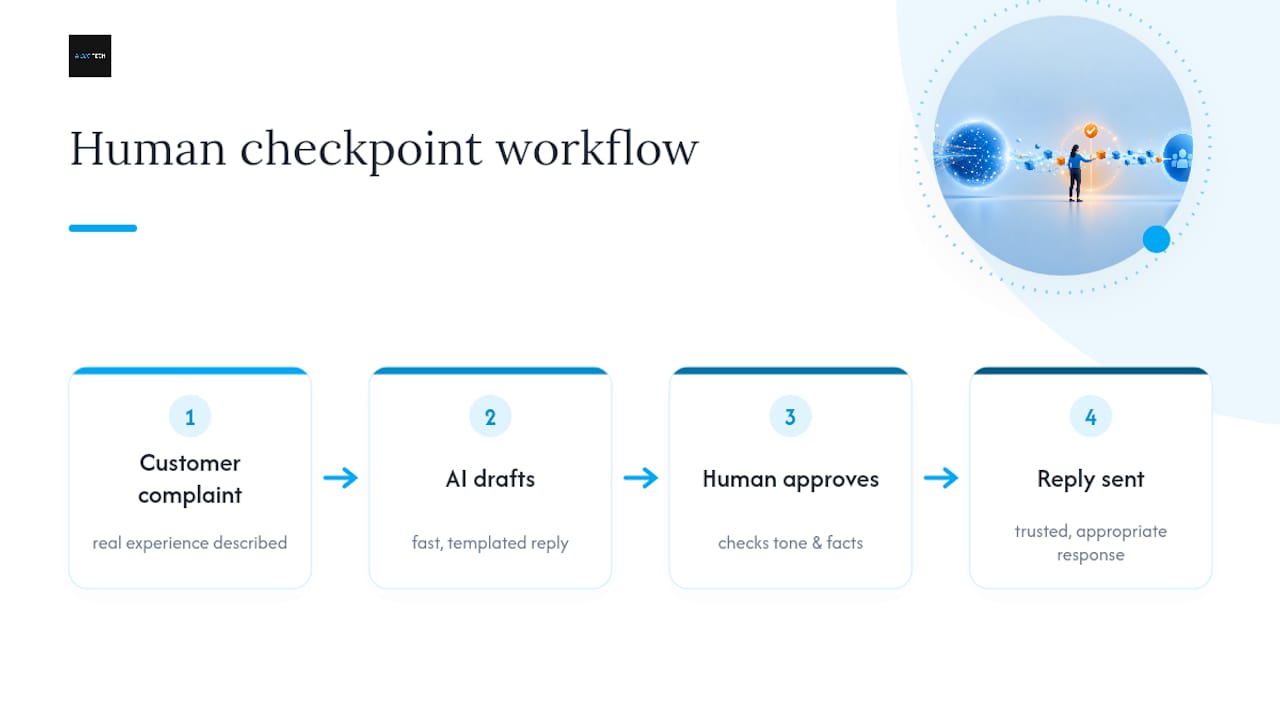
The workflow that keeps this trustworthy is human-in-the-loop by design, not an afterthought. AI drafts the reply. A team member edits it for specifics, tone, and accuracy. Only then does it publish, with an audit trail showing who approved what and when.
A central dashboard with sentiment-based triage keeps urgent complaints from getting buried under routine five-star notifications, turning review response from reactive firefighting into a repeatable system.
That structure produces measurable gains: faster adherence to response SLAs, a consistent brand voice across dozens or hundreds of replies a month, and a repeatable path for routing incidents to the right owner every time, not just when someone happens to notice. The alternative, a purely automated reply engine with no review step, tends to produce responses that sound templated fast, and customers notice.
How Do You Handle Fake or Policy-Violating Reviews?
Fake reviews tend to share patterns: generic language with no specific details about your business, a reviewer account with no history, a burst of similar negative reviews posted within hours of each other, or a competitor mentioned by name.
- Confirm the pattern by checking the reviewer’s profile history and cross-referencing your transaction records for any matching customer.
- Flag it directly through your Google Business Profile dashboard, which routes the review for platform evaluation, typically taking several days.
- Document everything: screenshots, timestamps, and any correlating evidence, before you flag, in case the review reappears or you need to escalate to platform support or legal counsel for repeated abuse.
Never buy reviews or ask employees to post them. Platforms actively look for this, and getting caught costs far more credibility than the fake reviews ever did.
Before you flag anything, check what actually counts as a violation in our explainer on Google reviews policy — reporting a review you simply disagree with rarely succeeds.
Your 30/60/90-Day Review Management Checklist
- Day 1: verify your Google Business Profile, set up review alerts, and list every other platform where you appear.
- Week 1: build your reply templates, assign an owner for daily triage, and set your response SLA targets.
- Month 1: run your first theme analysis across all platforms and identify your top two recurring complaints.
- Quarter 1: pilot a centralized dashboard or automation tool if review volume has outgrown manual tracking.
Track response time and rating trend from day one. Most businesses see their fastest improvement simply from closing the reply gap on existing unanswered reviews.
Why Human Oversight Still Decides Whether This Works
AI-only reply systems fail for a specific reason: they optimize for speed and consistency, not for the judgment a real complaint requires. A customer describing a genuinely bad experience can tell within one sentence whether they’re reading a templated response or a real one, and that recognition erodes trust faster than a slow reply would have.
The rule that holds up in practice is simple. AI drafts, a human approves. That single checkpoint catches the tone-deaf response, the factual error, the reply that technically follows the structure but misses what the customer actually said. Scaling review operations without that checkpoint isn’t scaling. It’s just producing more replies that sound like nobody read the review.
— Prasad
Let AISEO Tech Run Your Review Playbook
There are alternatives to hiring a full-time reputation team for businesses that need this playbook running every day, not just read about once. Some tools centralize every review channel into one dashboard, draft responses using AI, route each one through human approval before publishing, and report on sentiment trends so you can see whether your fixes are actually working.
Instead of assigning someone to manually check five platforms every morning, you get one view, one workflow, and one consistent voice across every reply your business sends. Pricing varies depending on review volume and channel mix, with pilot options available for businesses testing the approach before committing. If you’re managing reviews across multiple locations or you’ve noticed response times slipping, request a demo of ReviewSync and see how the workflow fits your actual review volume.
Sources
Start with Google’s own guide to managing reviews for exact steps on replying, editing, and flagging. Sprinklr’s review-management guide covers the full monitoring-to-resolution loop in more depth, and the US Chamber’s review guidance is worth bookmarking for tone and response strategy specifically.
- Manage customer reviews – Google Business Profile Help
- How to Grow and Manage Customer Reviews for Your Business | CO- by US Chamber of Commerce
- Business