Catch Issues Within Hours: Monitor Customer Reviews for Marketers

To monitor customer reviews effectively, set up a continuous system that collects feedback from every channel, analyzes it with AI-driven sentiment and theme detection, routes issues to the right team, and closes the loop with the customer. Businesses that automate this cycle catch reputation problems within hours instead of weeks and convert more browsers into buyers.
TL;DR:
- Review monitoring should cover all customer feedback channels, including local platforms, marketplaces, app stores, social media, vertical review sites, and direct channels.
- Proper tools integrate review aggregation, sentiment analysis, automated routing, and display widgets, with emphasis on seamless connectivity to existing systems like CRM and helpdesk.
- Building an effective workflow involves setting KPIs, centralizing feeds, auto-tagging issues, and establishing alert thresholds to ensure timely responses and issue escalation.
- Automated sentiment and theme detection transform large volumes of reviews into actionable insights, with dashboards tracking overall trends, topic volume, response rates, and star ratings.
- Response strategies should prioritize prompt, specific, and neutral replies, especially for negative feedback, with systematic ways to measure ROI including rating improvements and customer loyalty metrics.
Table of Contents
- What Does It Mean to Monitor Customer Reviews?
- Where Do Customers Actually Leave Reviews?
- Which Tools Actually Cover a Modern Review Stack?
- How Do You Build a Review-Monitoring Workflow?
- How Do You Analyze Reviews for Sentiment and Trends?
- How Should You Respond to Reviews and Close the Loop?
- How Do You Measure ROI From Review Monitoring?
- How AISEO’s ReviewSync Supports Review Monitoring at Scale
- What Legal and Ethical Rules Apply to Review Monitoring?
- How Does Review Monitoring Fit Into Broader Feedback Management?
- How Do You Handle Fake or Fraudulent Reviews?
- Author Perspective: Practical Pitfalls and Quick Wins
- How AISEO Turns Monitoring Into Managed Reputation
- Sources
- FAQ
What Does It Mean to Monitor Customer Reviews?
Review monitoring is the ongoing practice of tracking, reading, and acting on what customers say about your business across every public platform where they leave feedback. It goes beyond glancing at your Google star rating once a month.
The business case is direct. Reviews influence purchase decisions, shape how search engines rank your listings, and expose product or service gaps before they become churn. Teams that treat reviews as a live data stream, rather than an occasional check, catch small problems while they’re still small.
The AI Opportunity: Gartner projects worldwide AI spending will reach $2.5 trillion in 2026, a scale of investment that’s pushing automated sentiment analysis and theme detection into mainstream reputation management rather than niche enterprise tooling.
Where Do Customers Actually Leave Reviews?
Customers scatter feedback across far more places than most brands realize. A monitoring system that only watches one channel misses the majority of the conversation.
Group your coverage into these categories:
- Local and search platforms: Google Business Profile, Bing Places, and Apple Maps carry outsized SEO weight.
- Marketplaces: Amazon, Etsy, and industry-specific marketplaces where buyers rate specific products.
- App stores: Apple App Store and Google Play, where ratings directly affect download conversion.
- Social platforms: Facebook recommendations, X mentions, and Instagram comments.
- Vertical review sites: Yelp, TripAdvisor, G2, or Capterra depending on your industry.
- Direct channels: Support tickets, chat transcripts, and post-purchase surveys.
Each channel plays by different rules. Yelp discourages solicited reviews, Google enforces reply moderation policies, and app stores tie ratings to specific software versions. Prioritize channels where your customers already spend time, then expand outward as your monitoring maturity grows.
Which Tools Actually Cover a Modern Review Stack?
Review monitoring tools generally fall into four categories, and most mature stacks use a blend rather than a single tool.
- Aggregators pull reviews from multiple sources into one dashboard so you’re not logging into six platforms daily.
- Sentiment and NLP engines score review text as positive, negative, or neutral and flag emerging themes automatically.
- Automation layers handle alerting, ticket creation, and response drafting once a review meets certain criteria.
- Display widgets surface your best reviews on your website or landing pages to support conversion.
Integration matters more than feature count. A tool that can’t connect to your CRM, your helpdesk, Google Reviews, and your app store listings creates data silos instead of solving them. Look for native connections to Slack or Jira too, since that’s where most operations and support teams already work.
Pro Tip: Before signing anything, ask a vendor to demo how their sentiment engine handles sarcasm or mixed reviews (“great product, terrible shipping”). Weak NLP models score these as neutral when they should flag the shipping complaint as a priority issue.
Run every option through this checklist: does it cover your specific channels, does it support the languages your customers write in, does it automate routing instead of just alerting, and does it produce reports your executives will actually read?
A dashboard only helps if the surrounding process is sound, so pair tooling with the wider workflow in our guide to manage online reviews without losing control.
How Do You Build a Review-Monitoring Workflow?
A monitoring system without a defined process just generates noise. Build the workflow in this sequence:
- Set goals and KPIs first. Decide what you’re optimizing for, whether that’s average rating, response time, or resolution rate, before you evaluate a single tool.
- Centralize every feed. Pull reviews, survey responses, and support tickets into one system so a complaint about the same bug doesn’t look like three unrelated issues.
- Auto-tag by theme, product, and location. This is where AI earns its keep, sorting thousands of reviews into categories like “shipping delay” or “billing error” without manual reading.
- Set alert thresholds and SLA routing. A one-star review should hit a support inbox within minutes, not sit in a weekly digest.
- Convert flagged reviews into tickets. Attach the customer’s exact words so the person responding has full context immediately.
- Build escalation rules. Repeated complaints about the same product defect should automatically route to product management, not just customer support.
Platforms that extend alerts directly into Slack or Jira shorten the gap between a customer complaint and someone actually fixing it.
How Do You Analyze Reviews for Sentiment and Trends?
Reading reviews one at a time doesn’t scale past a few dozen a month. Sentiment analysis and theme extraction turn thousands of scattered comments into a short list of things worth fixing.
Modern NLP tools score each review’s tone and extract recurring topics, so “checkout was confusing” and “your payment page kept freezing” get grouped under one theme even though the wording differs. Expect roughly 80 to 90% accuracy from most sentiment engines on straightforward reviews, with more error on sarcasm or highly technical complaints.
Build a dashboard around these metrics:
- Overall sentiment trend over rolling 30 and 90 day windows.
- Topic volume, so you can see which theme is growing fastest.
- Response rate and average time-to-first-reply.
- Star rating distribution by product, location, or region.
Unified feedback platforms that combine surveys, tickets, and reviews into one sentiment view produce more actionable insight than reviews analyzed alone, because they tie a sentiment score to a specific account or purchase you can actually follow up on.
How Should You Respond to Reviews and Close the Loop?
Speed and tone both matter. Aim to respond promptly to negative reviews and respond to positive reviews within a reasonable time, since delayed responses can be perceived as indifference.
- Negative reviews: Acknowledge the specific issue, apologize without being defensive, and offer a clear path to resolution (a refund, a call, a fix timeline).
- Positive reviews: Thank the customer by name where the platform allows it, and reference something specific they mentioned.
- Escalation triggers: Route any review mentioning safety, billing disputes, or legal threats straight to a manager, bypassing the standard template queue.
Confirm resolution directly with the customer once you’ve acted, and ask if they’d consider updating their review. On Google Business Profile, your business must be verified before you can reply to reviews, and Google reviews every reply against its own policy, a process that can take anywhere from 10 minutes to 30 days.
Pro Tip: Keep three response templates on hand (billing issue, shipping delay, product defect) but always edit the first sentence to reference the customer’s specific complaint. A copy-pasted reply is easy to spot and can do more reputation damage than no reply at all.
Monitoring tells you a review exists; what you say next is a separate skill. Our step-by-step guide to how to reply to Google reviews covers the reply itself, including negative and star-only reviews.
How Do You Measure ROI From Review Monitoring?
Track four numbers on a monthly cadence: rating trend, average response time, resolution rate, and the delta in CSAT or NPS scores among customers whose complaints got resolved.
To estimate revenue impact, compare conversion rate on listings before and after a meaningful rating shift, say from 3.8 to 4.3 stars, and multiply that lift by your average order value and monthly traffic. CustomerGauge data cited by Listen360 found that businesses closing the loop on feedback saw three times as many promoters show up in later NPS surveys, a direct line from response discipline to loyalty.
Report these numbers to leadership monthly, with a quarterly deep dive that ties rating movement to specific product or service fixes.
How AISEO’s ReviewSync Supports Review Monitoring at Scale
ReviewSync is a reputation management platform built around a workflow including aggregation, automated tagging, SLA-based routing, and dashboard reporting in one system rather than multiple disconnected tools.
- It pulls reviews from various sources such as Google, app stores, and marketplaces into a single feed.
- It applies sentiment scoring and theme tagging automatically to reduce manual review reading.
- It routes flagged issues into existing CRM and helpdesk workflows to streamline handling.
- It displays rating trends and response metrics on dashboards suitable for regular reporting.
This approach reflects how reputation management functions as a genuine growth engine when monitoring, analysis, and response work as one connected system rather than three separate habits.
What Legal and Ethical Rules Apply to Review Monitoring?
Monitoring reviews is legal in virtually every jurisdiction, since you’re observing public statements customers chose to post. Where businesses run into trouble is in how they respond to and manage that feedback.
Never post fake reviews, incentivize reviews without disclosure, or ask employees to review their own employer. Several countries and platform policies treat these practices as deceptive marketing, and the reputational fallout from getting caught often outweighs any short-term ratings boost. Google’s own policy explicitly bans review gating, the practice of only inviting happy customers to leave public reviews while routing unhappy ones to a private form.
Privacy matters just as much as authenticity. If your monitoring system pulls customer names, purchase details, or contact information into a dashboard, you need a clear basis for storing that data and a retention policy that doesn’t hold it indefinitely. This becomes especially relevant when review text includes personal details the customer didn’t intend for public analysis, like a home address mentioned in a delivery complaint.
Responding publicly carries its own ethical line. Never confirm a customer’s purchase, account details, or complaint specifics in a public reply if doing so exposes information they’d reasonably expect to stay private. Move sensitive cases to a private channel and reply publicly with a brief, neutral acknowledgment instead.
Finally, be transparent internally about how AI is being used to score and prioritize reviews. If a sentiment engine’s tagging errors get treated as ground truth without human review, you risk misclassifying a serious complaint as low priority, or the reverse, escalating something the algorithm misread.
How Does Review Monitoring Fit Into Broader Feedback Management?
Reviews are one voice in a much larger conversation your customers are already having with you through support tickets, surveys, and chat transcripts. Treating review monitoring as its own silo means you’ll spot a problem in public reviews weeks after your support team already logged the same complaint internally.
The fix is structural, not just technical. Route review data into the same system that houses your survey and ticket data, so a spike in “shipping delay” mentions on Google shows up alongside a similar spike in support tickets, giving you one confirmed signal instead of two disconnected ones. Platforms like Chattermill illustrate this by unifying reviews, surveys, and tickets into a single feed and applying AI to surface the themes that matter most, then routing them into the tools where CX, product, and support teams already work.
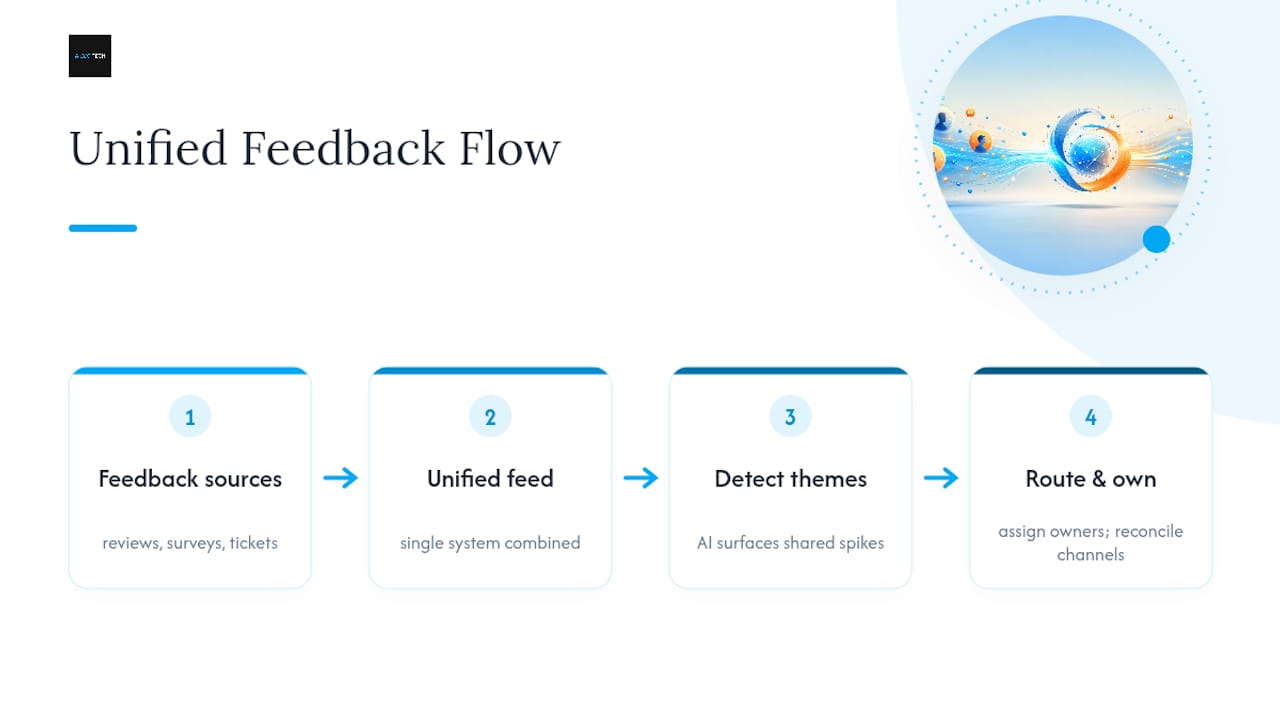
Assign clear ownership across teams. Product should own defect-related themes, support should own service complaints, and marketing should own response tone and public-facing remediation. Without that division, reviews get monitored but nobody feels accountable for acting on what they reveal.
Close the loop consistently, not just for reviews but for every channel feeding your feedback system. A customer who reports a bug through a support ticket and later leaves a matching complaint in a public review should see the same resolution reflected in both places. Reconcile your review data with your NPS and CSAT surveys quarterly, checking whether the themes showing up in reviews match what your structured surveys are picking up. When they diverge, that gap usually means one channel is capturing a customer segment the other is missing entirely.
How Do You Handle Fake or Fraudulent Reviews?
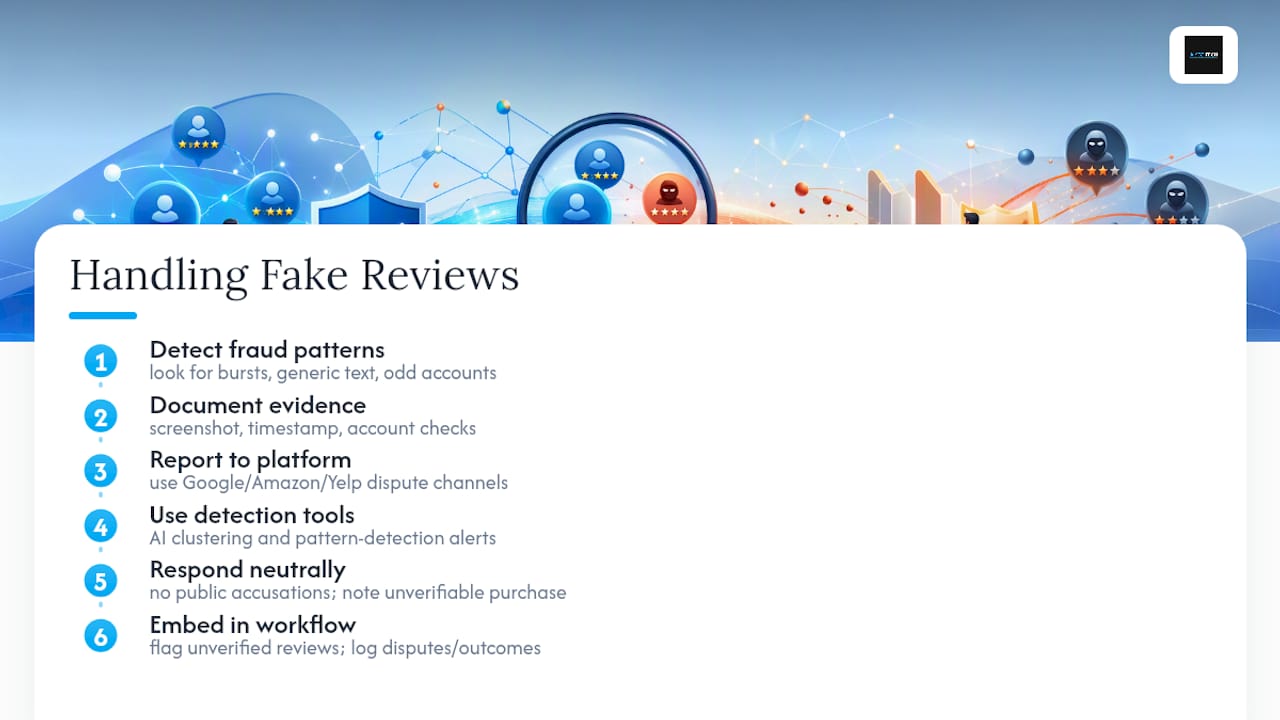
Fake reviews show up in patterns once you know what to look for: a burst of five-star reviews within a short window, reviewer accounts with no other activity, oddly generic language that doesn’t reference specifics, or a wave of negative reviews from accounts with no purchase history right after a product launch or a PR issue.
Most platforms provide a formal flagging or dispute process. Google, Amazon, and Yelp all let businesses report reviews that violate content policies, though approval isn’t guaranteed and the review process can take days to weeks. Document your case before reporting: screenshot the review, note the timestamp pattern, and check whether the reviewer’s account has any verifiable connection to a real transaction.
Sentiment and pattern-detection tools help here too. A sudden cluster of near-identical negative reviews using similar phrasing is a stronger fraud signal than a single harsh review, and AI-driven monitoring tools can flag these clusters automatically rather than relying on someone noticing the pattern manually.
Never retaliate publicly, even when you’re confident a review is fake. A defensive or accusatory public reply damages your credibility with every other reader far more than the fake review itself does. Respond neutrally, note that you’ve been unable to verify the transaction, and pursue removal through the platform’s official channel.
Build fraud checks into your standard monitoring workflow rather than treating them as a one-off investigation. Flag reviews with no verified purchase for manual review before they factor into your public rating trend, and keep a running log of disputed reviews and their outcomes so you can spot repeat offenders or targeted campaigns against your business.
Monitoring surfaces suspicious reviews; removing them is a different process. Follow the evidence steps in our playbook for removing fake Google reviews before you submit any appeal.
Author Perspective: Practical Pitfalls and Quick Wins
The most common failure in review monitoring isn’t a missing tool. It’s missing ownership: alerts fire, nobody’s job is to act on them, and the noise gets ignored within weeks. The second failure is treating every alert as urgent, which trains teams to tune out the system entirely.
The fix is boring but effective. Assign one owner per channel, automate the first triage pass, and put sentiment trends on a weekly agenda instead of a quarterly one.
— Prasad
How AISEO Turns Monitoring Into Managed Reputation
Most businesses reach a point where reading reviews manually across five platforms just isn’t sustainable, and that’s the exact gap ReviewSync closes. Aiseo built the platform for teams that want the aggregation, tagging, and routing described throughout this guide without stitching together three separate subscriptions to get there.
Some tools combine data visibility with response automation and reporting focused on reputation outcomes rather than just feedback collection. For teams also weighing lightweight automation on a tighter budget, this overview of practical AI tools for small businesses covers where a smaller stack can still deliver real ROI.
If your ratings are scattered across Google, app stores, and marketplaces with no single view tying them together, that’s the exact problem worth solving first. Visit Aiseo to request a demo or pilot assessment, and see how ReviewSync would tag and route your current review volume before you commit to anything.
Sources
For platform-specific rules, review Google’s Business Profile review policy. For feedback-loop best practices, see Listen360’s tracking guide.
- Manage customer reviews – Google Business Profile Help
- Gartner press release on worldwide AI spending
- Zonka Feedback – AI Customer Feedback & Intelligence Platform
FAQ
How Can I Write a Good Customer Review?
A good review names the specific product or service used, describes what worked or didn’t in concrete terms, and avoids vague praise or complaints that give the business nothing to act on.
How Do I Display Customer Reviews on My Website?
Use a review widget that pulls verified reviews automatically from platforms like Google, so displayed ratings stay current without manual updates, and always disclose if any reviews were incentivized.
How Do I Check My Customer Reviews Across Platforms?
Check each major channel individually, Google Business Profile, app stores, and relevant marketplaces, or use an aggregator tool like ReviewSync to pull them into a single dashboard rather than logging into each platform separately.
How Do I Collect Customer Reviews the Right Way?
Ask for reviews shortly after a positive interaction through email or SMS, never selectively invite only satisfied customers, and disclose any incentive offered in exchange for honest feedback.
How Often Should I Monitor Customer Reviews?
Set up real-time alerts for new reviews and check sentiment dashboards weekly at minimum, since delayed responses to negative reviews compound reputation damage the longer they sit unanswered.