Local SEO Audit for Small Businesses: Boost Map Pack in 30 Days

A local SEO audit reviews the signals that determine whether your business shows up in the Map Pack and local organic results, from Google Business Profile completeness to NAP consistency across the web. Verify your GBP status and primary category, fix any mismatched business information across directories, and confirm your NAP appears in readable text on your website. Get those three right, and you should see higher GBP impressions and calls within weeks.
TL;DR:
- Verifying your Google Business Profile is essential, ensuring the listing is claimed, accurate, and optimized with the right primary category and current photos.
- Your website must display consistent NAP information in real text, with optimized title tags and unique, location-specific content on service pages to support local rankings.
- Fixing technical issues like indexing errors, schema errors, and slow page speeds can significantly improve your local visibility and rankings.
- Maintaining citation consistency across major directories and managing review quality and responses directly influence local trust and ranking signals.
- Prioritize fixes by impact and effort, focusing on high-value tasks such as optimizing GBP insights, correcting schema, speeding load times, and cleaning citations for measurable growth.
Table of Contents
- What Does a Local SEO Audit Actually Check?
- Does Your Website Reinforce Your Local Signals?
- Are Technical Issues Blocking Your Local Rankings?
- How Do You Fix Inconsistent Citations Across the Web?
- What Should You Track in Your Review Profile?
- Which Local Backlinks Actually Move the Needle?
- Which Local Keywords Should You Actually Track?
- How Do You Turn Findings Into a Prioritized Plan?
- What Tools Actually Speed Up an Audit?
- A Publisher’s View: Turning Audits Into Measurable Growth
- Let Aiseo Handle the Fixes Your Audit Uncovers
- Where to Verify These Checks Yourself
- Sources
What Does a Local SEO Audit Actually Check?
A local SEO audit starts with Google Business Profile because that’s where most local search traffic converts into phone calls and store visits. GBP completeness and NAP consistency deliver the fastest map-pack improvements of any category you’ll review, which is why they come first in this checklist and not buried on page three of a spreadsheet.
Verify your listing status first. An unverified GBP simply won’t rank, no matter how strong the rest of your presence is. Log into your profile and confirm the verification badge is active, then check your primary category. Google gives you one primary category and several secondary ones, and picking “Marketing Agency” when “Local SEO Agency” exists costs you visibility on the exact searches you want.
Here’s what to run through on every profile:
- Business name matches your storefront signage exactly, with no keyword stuffing (“Joe’s Plumbing” not “Joe’s Plumbing Emergency 24/7 Best Rated”)
- Primary category is the most specific option Google offers, not the broadest
- Business description reads naturally and mentions your service area without repeating keywords
- Services and products sections list every offering with accurate pricing where possible
- Photos are current, show the actual location or team, and get uploaded monthly at minimum
- Hours reflect real hours, including holiday adjustments
- Booking or ordering links work and route to the correct page
Once the fields are clean, open GBP Insights. This is where most owners stop looking too early. Insights shows the exact search queries triggering your listing, whether customers found you through direct search or discovery search, and what action they took, call, direction request, or website click. If “near me” queries are driving impressions but not clicks, your listing photos or reviews likely need work before your ranking does.
Duplicate listings are the silent killer here. Search your business name and address in Google Maps from an incognito window. If a second, unclaimed listing appears, usually created by a data aggregator years ago, it splits your reviews and confuses Google’s local algorithm about which profile is authoritative. Request merger through Google’s support tools rather than ignoring it.

Pro Tip: Set a recurring calendar reminder to check GBP Insights every two weeks. Search query data shifts with seasonality, and catching a new “near me” trend early lets you adjust photos and posts before competitors do.
Does Your Website Reinforce Your Local Signals?
Your Google Business Profile tells Google where you are. Your website has to prove it. This is the piece most small business sites get wrong, either by hiding NAP information in a footer image or by never mentioning the service area in actual page text at all.
Check that your name, address, and phone number appear as real, selectable HTML text, not embedded in a logo graphic or a PDF. Search engines can’t reliably parse text inside images, and neither can the screen readers many customers rely on. Format your address consistently on every page: if you write “St.” on the contact page, don’t switch to “Street” on the location page.
Title tags and meta descriptions need to work harder than most business owners expect. A generic title like “Home | Acme Plumbing” wastes the most valuable 60 characters on your site. Something like “Emergency Plumber in Riverside, CA | Acme Plumbing” tells both searchers and algorithms exactly what you do and where.
Run through this on every service and location page:
- H1 includes the service and the city or neighborhood, written as a real sentence, not a keyword string
- Page content answers a specific local question (“Do you offer weekend emergency service in Riverside?”) rather than restating generic industry copy
- Internal links connect related service pages and location pages so Google can crawl the relationship between them
- Each location page has unique content describing that specific area, not a copy-pasted template with the city name swapped out
That last point deserves emphasis. Google has gotten notably better at detecting thin, duplicated location pages, the kind franchises and multi-location businesses churn out by find-and-replace. If you serve five towns, write five genuinely different pages describing parking availability, nearby landmarks, or town-specific service quirks. One well-written page outperforms five templated ones.
Are Technical Issues Blocking Your Local Rankings?
Technical problems are invisible until they’ve quietly capped your visibility for months. Start with indexation: pull up Google Search Console’s Coverage report and check whether your service and location pages are actually indexed. A page that’s crawlable but excluded, often due to a stray “noindex” tag or a canonical pointing elsewhere, never shows up no matter how well it’s written.
Check your robots.txt file next. It’s a two-minute look, but a misconfigured disallow rule has quietly blocked entire location folders on more sites than most agencies would admit.
Structured data is where technical audits earn their keep. Run your LocalBusiness JSON-LD through the schema validator to confirm it’s syntactically correct, then cross-check it against Google Search Central’s structured data guidance to make sure you’re using supported properties. A validator that passes doesn’t guarantee Google will use the markup, but a validator that fails guarantees it won’t.
Then there’s speed. Lighthouse measures Core Web Vitals, Largest Contentful Paint, Cumulative Layout Shift, and Time to First Byte, and these numbers directly affect whether a mobile searcher calls you or bounces to the next Map Pack result. Prioritize fixes here by conversion impact, not by which score looks worst on paper. A slow-loading hero image that delays LCP on your booking page usually costs more than a minor CLS shift buried in the footer.
Your checklist for this pass:
- Confirm location and service pages return a 200 status and appear in Search Console’s index
- Validate LocalBusiness schema and fix any errors flagged
- Run Lighthouse on mobile for your top three landing pages
- Resolve redirect chains and duplicate canonical tags on location pages
- Fix broken internal links pointing to old location URLs
Local audit checklists consistently treat structured-data validation and mobile speed as non-negotiable technical baseline items, not optional extras.
How Do You Fix Inconsistent Citations Across the Web?
A citation is any online mention of your business name, address, and phone number, sometimes shortened to NAP, sometimes NAP+W when a website URL is included. Formatting matters more than people expect. “123 Main St, Suite 4” and “123 Main Street #4” read as the same address to a human and as two different businesses to some local ranking algorithms.
Run the process in this order:
- Search your exact business name plus city across Google to surface every listing, then check major aggregators and industry-specific directories relevant to your field.
- Log every inconsistency you find in a simple spreadsheet, noting the directory, the current listing details, and the correct version.
- Claim any unclaimed listings before submitting corrections, since unclaimed profiles often get ignored by directory support teams.
- Submit corrections directly through each platform’s business portal rather than relying on third-party update requests.
- Track which corrections have actually gone live, since some directories take weeks to process changes.
For a handful of locations, manual fixes are manageable in an afternoon. Past a dozen citations or multiple business locations, a citation-monitoring tool earns its cost by flagging drift automatically instead of requiring you to re-search every quarter.
What Should You Track in Your Review Profile?
Reviews function as both a ranking signal and a conversion lever, so audit them on two tracks simultaneously: health metrics and response quality.
Track four numbers: your average rating, review velocity (new reviews per month), distribution across platforms, and how recent your last five reviews are. A 4.8-star average built entirely on reviews from three years ago signals stagnation to both customers and Google’s freshness signals.
- Average rating and trend direction over the last six months
- Review velocity compared to your closest local competitors
- Platform distribution, since a business with reviews only on one platform looks less credible than one spread across two or three
- Percentage of reviews with an owner response
Fake or incentivized reviews usually show a pattern: a cluster of five-star reviews posted within days of each other, generic language repeated across multiple reviews, or reviewers with no other review history. Flag these through the platform’s reporting tool rather than ignoring them, since a cluster of suspicious reviews can trigger a manual quality review of your entire profile.
Respond to every review, positive or negative, within 48 hours where possible. A short, specific response (“Thanks for the feedback on wait times, Sarah, we’ve added a second technician on weekends”) does more for conversion than a generic “Thank you for your review.”
Pro Tip: Ask happy customers for reviews immediately after a completed job, not days later. The closer the request sits to the positive experience, the higher your response rate.
Which Local Backlinks Actually Move the Needle?
Not all local links carry equal weight. A link from your local chamber of commerce or a community newspaper covering a sponsorship you funded tends to outperform a generic directory listing, because it signals real community presence rather than a database entry.
Audit your existing backlink profile for relevance first. A link from a blog in another country with no connection to your industry does nothing and, in bulk, can look manipulative. Prioritize links from:
- Local news outlets covering events, openings, or community involvement
- Chambers of commerce, business associations, and local nonprofits you sponsor or partner with
- Suppliers, vendors, or complementary businesses who list you as a partner
- Local resource pages maintained by universities, libraries, or municipal sites
Build new links by sponsoring a local event, donating services to a nonprofit that lists supporters on its site, or offering a genuinely useful local resource, like a neighborhood parking guide, that other sites want to reference. Prioritize outreach targets by impact times effort: a single chamber of commerce link often outweighs ten low-authority directory submissions combined.
Which Local Keywords Should You Actually Track?
Pull your query data from two places: GBP Performance and Google Search Console. GBP shows what people searched before clicking your listing; Search Console shows what drove them to your website. Together, they tell you where the gaps are.
Separate high-intent queries from informational ones early. “Emergency plumber near me” and “plumber in Riverside” convert differently than “how to fix a leaky faucet,” and lumping them into one ranking report obscures where your real opportunity sits.
- Extract top queries from GBP Performance and Search Console over a 90-day window
- Flag “near me” and “[service] + [city]” queries as priority tracking terms
- Set a competitor baseline by checking Map Pack results for your top five queries and noting who consistently appears
- Compare impressions against clicks to find queries where you’re visible but not compelling enough to earn the click
A high-impression, low-click query usually points to a title tag or review-count problem, not a ranking problem. Fix the listing before assuming you need to chase a higher position.
How Do You Turn Findings Into a Prioritized Plan?
An audit that produces a fifty-item list without ranking anything just creates paralysis. Score every finding on two axes: impact (how much it could move visibility or conversions) and effort (how long it takes to fix). Then select your top three to five fixes, no more, for the current cycle.
- List every finding from the sections above in one document.
- Score each on impact (high, medium, low) and effort (quick, moderate, involved).
- Select the three to five highest-impact, lowest-effort items as your immediate action list.
- Assign an owner and a deadline to each item.
- Schedule the next review before you close out the current one.
A client-ready executive summary doesn’t need to run more than a few sentences: current status, the single biggest opportunity you found, and the top three priority fixes with estimated effort. Fixing both this week should improve Map Pack visibility within 30 days."
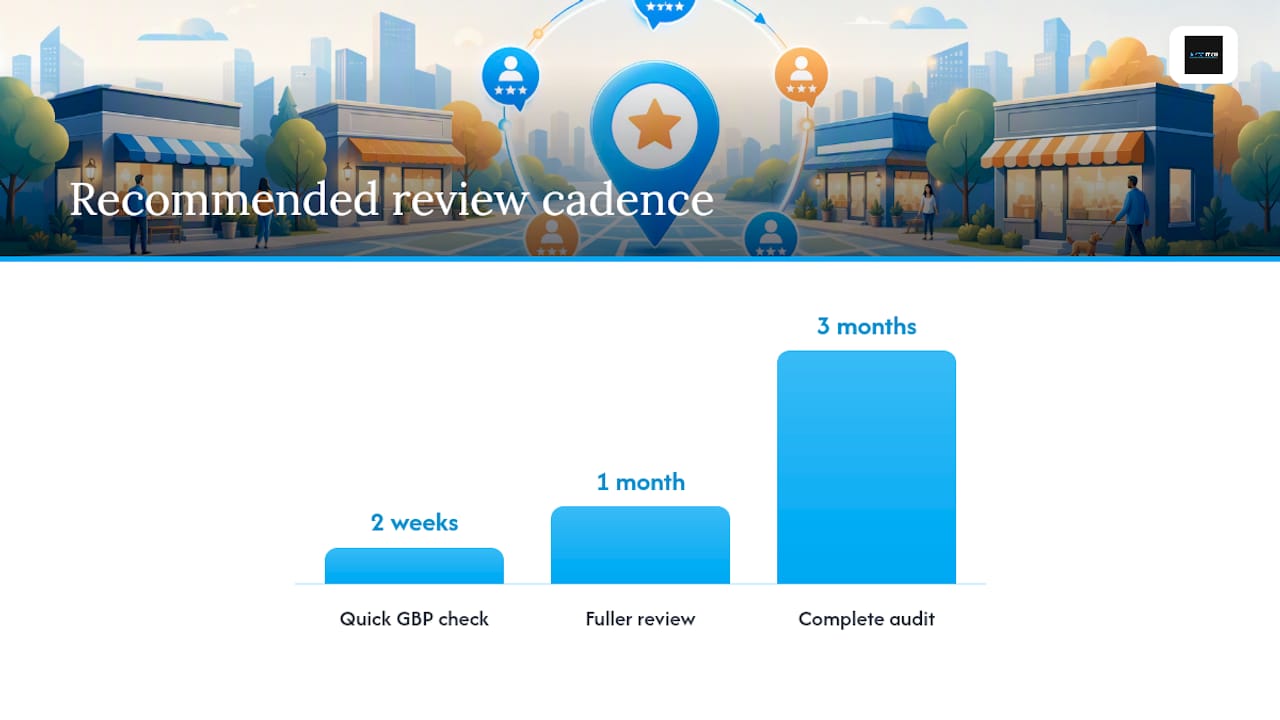
Recommended cadence: a quick GBP and review check every two weeks, a fuller review of citations and on-page signals monthly, and a complete audit covering technical, backlink, and competitor benchmarking every quarter. Track outcomes against calls, website clicks, and map impressions in GBP Insights so the next report shows measurable movement instead of just a new list of tasks.
Pro Tip: Attach a simple before-and-after screenshot of GBP Insights to your report. Clients remember a chart moving up far more than they remember a checklist getting checked off.
What Tools Actually Speed Up an Audit?
You don’t need a dozen subscriptions to run a solid audit. You need one tool per category and a habit of using them consistently.
For GBP inspection, GBP Insights itself covers most of what you need. For schema, validator.schema.org confirms your JSON-LD is clean. For Core Web Vitals, Lighthouse gives you mobile performance scores in under a minute. For a fast, no-signup starting point that checks GBP, NAP, schema, and technical basics in one pass, LocalHero’s free audit tool runs 75-plus checks and returns a ranked issue list. For citation monitoring and structured checklists, resources like this 12-step local SEO checklist fill in gaps an automated tool might skip.
Use automated tools to surface deterministic issues fast, then verify manually before you report anything to a client. A tool flagging “missing schema” is useful; confirming why it’s missing takes a human look.
| Check category | Best tool type | Report placement |
|---|---|---|
| GBP completeness | GBP Insights | Executive summary |
| Schema validation | Schema validator | Technical section |
| Core Web Vitals | Lighthouse | Technical section |
| Citation consistency | Monitoring tool or manual log | Citations section |
A Publisher’s View: Turning Audits Into Measurable Growth
Most audits fail not because they miss issues, but because nobody translates the findings into action. That’s the gap Aiseo built its workflow around: an AI-driven process that moves straight from audit findings to prioritized fixes, instead of handing a business owner a fifty-page PDF and wishing them luck.
Reviews deserve special attention here, because they’re the signal small businesses neglect longest. ReviewSync consolidates reviews across platforms, flags sentiment shifts, and helps automate responses, which matters because an audit that catches a review problem in March and doesn’t get acted on until August has already cost three months of lost trust signals.
The honest lesson from running these audits repeatedly: the businesses that see real ranking movement aren’t the ones with the longest fix lists. They’re the ones that close the loop between finding an issue and correcting it within days, not quarters.
— Prasad
Let Aiseo Handle the Fixes Your Audit Uncovers
Running the audit yourself gets you the diagnosis. Acting on fifty flagged issues while still running your business is where most owners stall out, and that’s the gap Aiseo’s reputation management platform closes.
ReviewSync monitors reviews across every major platform from one dashboard, flags negative sentiment before it spreads, and helps you respond faster than a manual weekly check ever could. If your audit turned up review gaps, citation drift, or GBP inconsistencies that need ongoing attention rather than a one-time fix, that’s exactly where a managed workflow earns its cost. Handling everything solo with free tools works fine for a single location checked quarterly; once you’re juggling multiple listings, staff turnover, and review volume, the manual approach starts eating hours you don’t have.
Visit Aiseo to see how the platform tracks your fixes and get a plan built around what your audit actually found.
Where to Verify These Checks Yourself
Two resources back the technical claims in this guide: validator.schema.org confirms LocalBusiness JSON-LD is error-free, and Google Search Central’s structured data documentation explains which schema properties Google actually supports. For a broader checklist beyond this one, Search Engine Journal’s 11-point local audit guide is worth bookmarking.