5 Quick Wins to Optimize Google Business Profiles for Local Businesses

The fastest local visibility gains come from five moves: verify your profile, lock down accurate name, address, phone, and hours, select the correct primary category, build a steady review pipeline with replies, and add photos plus a working booking link. Get those right and you should see more calls, more direction requests, and more website clicks within weeks. Google’s own guidance, tools like ReviewSync, and consistent profile management all point the same direction.
TL;DR:
- Verifying your profile through postcard, phone, or instant methods is essential to gain full control and improve ranking; assign roles carefully post-verification.
- Completing every profile field accurately, including NAP consistency, correct hours, and relevant attributes, prevents ranking drops and attracts more customers.
- Specific primary categories and detailed service listings carry more ranking weight than broad labels and directly match long-tail search queries.
- Authentic photos and videos, refreshed seasonally, significantly increase customer engagement and help visitors recognize your business before entering.
- Continuous reputation management using tools like ReviewSync ensures your review profile remains active, responsive, and retains local visibility over time.
Table of Contents
- What Does Verifying Your Business Profile Actually Do?
- How Do You Fill Out Every Profile Field Correctly?
- Which Categories and Services Should You Add?
- What Photos and Videos Actually Move the Needle?
- How Do You Turn Profile Views Into Bookings and Orders?
- How Should You Build a Review Collection System?
- Are Google Posts and Q&A Worth the Effort?
- What Should You Track in Your Profile Insights?
- What Mistakes Quietly Sink an Otherwise Good Profile?
- What Does a 30/60/90-Day Optimization Plan Look Like?
- Combining Profile Optimization With Ongoing Reputation Management
- How ReviewSync Keeps Your Profile Working After Setup
- Sources
What Does Verifying Your Business Profile Actually Do?
Verification tells Google you are the real owner, not a competitor or a stranger who claimed your listing by mistake. Until that happens, you can’t edit hours, respond to reviews, or add photos with full control, and an unverified or contested listing tends to rank worse than a confirmed one.
Google offers a few verification paths, and which one you get depends on your account and business type:
- Postcard by mail — the most common method; Google sends a code to your listed address.
- Phone or email verification — faster, but only available for certain eligible accounts.
- Instant verification — automatic for businesses already verified through Google Search Console.
Once verified, assign roles carefully. Make yourself the Owner, add a trusted employee or your marketing partner as a Manager, and set a recovery email tied to a real person, not a shared inbox that gets abandoned when staff turn over.
How Do You Fill Out Every Profile Field Correctly?
Google’s own guidance on improving local ranking treats a complete profile as a baseline requirement, not a bonus. Incomplete fields leave gaps that Google fills with guesses, and guesses are rarely flattering.
- Match your NAP everywhere. Your business name, address, and phone number on the profile must mirror your website footer and any directory listings word for word, digit for digit.
- Set accurate hours, including holidays. A wrong closing time sends a customer to a locked door, and that’s the kind of experience that shows up in a one-star review by evening.
- Choose storefront or service-area correctly. A retail shop lists a physical address; a plumber or mobile groomer should hide the address and define a service radius instead.
- Check every attribute. Wheelchair access, outdoor seating, women-led, LGBTQ+ friendly, and similar tags help you surface in filtered searches customers actually use.
Skipping any of these fields doesn’t just cost you ranking. It costs you the customer who almost walked in but couldn’t confirm you were open.
Which Categories and Services Should You Add?
Your primary category carries more ranking weight than almost anything else on the profile, so treat it as a decision, not a formality. A bakery that calls itself a “Restaurant” because it also serves sandwiches will lose ground to a bakery that picked “Bakery” as primary and added “Restaurant” as secondary.
- Pick the most specific category that matches what you actually sell, not the broadest one that sounds impressive.
- Add secondary categories to cover adjacent searches, but keep the primary tightly focused.
- List individual services with short descriptions so Google can match you to long-tail searches like “same-day key cutting.”
- Turn on product listings if you run an eligible retail business. Google restricts this feature by business type and country, so confirm eligibility before you build out a full catalog.
What Photos and Videos Actually Move the Needle?
Real photos beat stock photos every time, and profiles with authentic images tend to earn more clicks and direction requests, according to guidance from Backlinko’s Google Business Profile breakdown. Customers want to see what they’re walking into before they commit to walking in.
- Exterior shots so first-time visitors recognize your storefront from the street.
- Interior shots that show the actual space, not just the cleanest corner.
- Team photos, which build trust faster than almost any other image type.
- Product or menu shots, ideally updated whenever your offerings change.
- Before-and-after photos if your work is visual (renovation, landscaping, salons).
- A 15 to 30 second video walkthrough or product demo, shot horizontally, under 100MB.
Pro Tip: Refresh your photo set every season, even if nothing in your business has changed. Google and customers both read a stagnant photo gallery as a sign the listing, and maybe the business, has gone quiet.
How Do You Turn Profile Views Into Bookings and Orders?
A profile view that doesn’t lead anywhere is a wasted click. Google Business Profile supports bookings, ordering links, and product listings directly on the listing, and businesses that treat the profile as a real storefront convert more of that traffic into actual revenue.
- Restaurants and salons should connect a booking partner or ordering integration directly through the profile dashboard.
- Service businesses can add an appointment link even without a full booking platform. A tool like online booking software can handle the scheduling logic behind that link.
- Test every link from a phone, not just a desktop browser, since that’s how most customers will click.
- Confirm the booking button displays correctly on both the Search and Maps views of your listing.
How Should You Build a Review Collection System?
Review volume and recency function as ranking signals, and Google explicitly recommends responding to every review as a way to demonstrate engagement and earn trust. But most businesses treat review collection as an afterthought instead of a repeatable process.
- Ask at the moment of highest satisfaction. Right after a completed service or a good meal, not three days later by email.
- Send a short link, not a long form. Friction kills follow-through; a direct link to your review page removes the excuse to skip it.
- Follow up once, politely, within a week. A single reminder recovers a meaningful share of customers who meant to leave a review and forgot.
- Respond to every review, positive and negative, without copying the same canned line each time. Acknowledge specifics, thank the reviewer by name if they gave one, and never argue publicly with a negative review.
- Track velocity, not just total count. A profile with 40 reviews from two years ago looks less active than one with 15 reviews from the last two months.
Pro Tip: Keep a simple spreadsheet of review dates and star ratings by month. A sudden drop in volume usually means your ask process broke somewhere, not that customers suddenly got unhappy.
A consistent process for asking, timed with a short link and a brief follow-up, scales far better than ad-hoc requests that depend on staff remembering to mention it.
Are Google Posts and Q&A Worth the Effort?
Yes, and they’re underused. Posts about offers, events, or new products keep your profile active, which Google appears to reward with modest visibility gains, and they give customers a reason to check back.
- Post at least once a week; offers and events tend to outperform generic updates.
- Seed your own Q&A section with the five questions customers ask most, before a stranger posts a wrong answer that sits there for months.
- Monitor the Q&A section regularly and correct or flag inaccurate answers fast.
- Use attributes like “wheelchair accessible entrance” or “online care appointments” to surface in filtered and accessibility-focused searches.
What Should You Track in Your Profile Insights?
Profile insights answer a simple question: are people finding you, and are they doing anything once they do? Watch three categories closely: how many searches surfaced your listing, how many people viewed your profile, and how many took an action, meaning calls, website clicks, or direction requests.
- Compare direct searches (people who typed your business name) against discovery searches (people who typed a category or need).
- Use the actual search terms customers used to refine your business description and service list.
- Set one simple monthly KPI, like a 10% increase in direction requests, tied to a real business outcome such as foot traffic or bookings.
Profiles with fuller descriptions and stronger review counts consistently show up with higher visibility and better conversion rates than sparse, rarely updated listings. Insights are how you find out whether your changes actually worked, not just whether you made them.
What Mistakes Quietly Sink an Otherwise Good Profile?
- Inconsistent NAP across your website, directories, and the profile itself, which confuses Google’s matching and erodes trust.
- Choosing a broad or aspirational category instead of the one that precisely matches your core business.
- Letting photos go stale for a year or more, especially after a renovation or menu change.
- Ignoring reviews for weeks, which reads as neglect even when the reviews are positive.
- Stuffing keywords into your business name field, a move Google flags and that can get a profile suspended.
What Does a 30/60/90-Day Optimization Plan Look Like?
- Days 1 to 7: Verify the profile, correct NAP across every field, set the primary category, and upload essential exterior, interior, and team photos.
- Days 8 to 30: Launch a review request campaign, fill out every service and product entry, and enable booking or ordering links if your business qualifies.
- Ongoing, weekly and monthly: Check Q&A and post a weekly update, then review your insights dashboard once a month to adjust your description, categories, and KPIs.
The checklist approach works because it forces sequencing. Verification before categories, categories before reviews, reviews before you chase smaller wins like attributes and Q&A.
Combining Profile Optimization With Ongoing Reputation Management
Most businesses treat Google Business Profile optimization as a one-time setup task, and that’s the mistake. A profile you configure correctly in January and never touch again will drift: reviews go unanswered, photos age, competitors out-post you. Prominence, one of Google’s three core local ranking factors, rewards businesses that stay active, not ones that were active once.
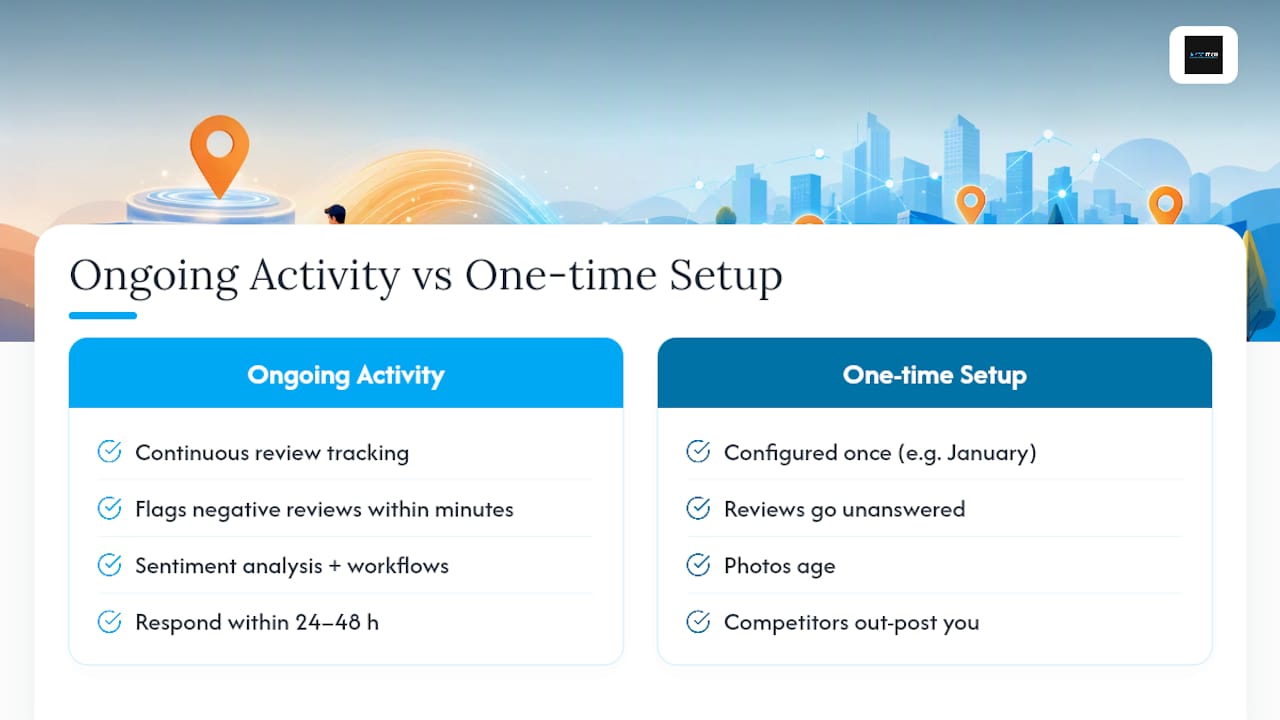
Continuous review tracking matters more than most owners assume. A tool built for reputation management can flag a negative review within minutes instead of days, which changes whether your response looks attentive or belated. AISEO Tech built ReviewSync around exactly that gap, pairing sentiment analysis with response workflows so review management doesn’t fall to whoever has five spare minutes that week.
Hire out this work once your review volume outpaces your team’s capacity to respond within 24 to 48 hours. Below that threshold, a disciplined owner can run it manually.
— Prasad
How ReviewSync Keeps Your Profile Working After Setup
Aiseo is the practical next step once you’ve done the manual optimization above and want the review side running without daily babysitting. ReviewSync monitors reviews across Google and other platforms in real time, applies sentiment analysis to flag urgent negative feedback, and routes responses through a workflow instead of a scattered inbox.
DIY works fine at low review volume with one person accountable for checking daily. Once you’re managing multiple locations, or review requests are going out but responses are lagging past a day or two, that’s the handoff point. AISEO Tech pairs reputation management with the SEO and profile maintenance work covered in this checklist, so the gains you make this month don’t quietly erode by next quarter. Visit AISEO Tech to see how ReviewSync fits your current review volume and get a straightforward quote.
Sources
- Tips to improve your local ranking on Google
- Get listed on Google – Google Business Profile
- How to Optimize Your Google Business Profile in 2026
- Google Business Profile Optimization: Improve Local Ranking