Pick CRM or Marketing Automation by Team Size, Lead Volume & Reviews

A CRM manages deals and relationships; marketing automation manages campaigns and nurture at scale. Start with a CRM if you need visibility into a sales pipeline or run a direct-sell model with a small team. Start with marketing automation if you’re drowning in inbound leads, running ecommerce, or need to nurture prospects before a rep ever talks to them. If your customer journey spans awareness to closed deal with multiple touchpoints, you’ll eventually need both.
TL;DR:
- If your inbound lead volume exceeds 50 per week or your sales cycle is short, starting with marketing automation will provide faster results.
- Small teams managing fewer than 20 inbound leads weekly with longer sales cycles should prioritize implementing a CRM first for better pipeline management.
- Integrating CRM and marketing automation requires clear field ownership, explicit mapping, and defined handoff triggers to prevent data conflicts and ensure accurate revenue attribution.
- Relying solely on a bundled system is suitable for smaller teams, but larger or more specialized organizations benefit from customized, best-of-breed integrations to maintain control.
- Incorporating AI-driven signals and reputation data enhances lead scoring accuracy and can significantly improve conversion rates by capturing trust factors unnoticed by basic automation tools.
Table of Contents
- What Is a CRM? Core Capabilities, Users, and Outcomes
- What Is Marketing Automation? Core Capabilities, Users, and Outcomes
- CRM vs. Marketing Automation: The Direct Comparison
- How CRM and Marketing Automation Work Together
- Which Should You Implement First? A Decision Framework
- Common Pitfalls and Best Practices
- Implementation Checklist and Realistic Timeline
- How AI and Reputation Signals Sharpen the Funnel
- Where Aiseo Fits If You’d Rather Not Build This Alone
- Sources
What Is a CRM? Core Capabilities, Users, and Outcomes
A CRM manages one-to-one relationships and deals through a pipeline, storing contact history, activity logs, and revenue data tied to each account. It’s built around the individual: this person, this deal, this conversation history. Every note, call log, and email thread lives in one record that a sales rep can pull up in seconds before a follow-up call.
Sales reps, account managers, and customer success teams live in a CRM daily. They use it to track where each deal sits, log activities, and set reminders for follow-ups. Support teams often use the same records to see purchase history before a service call, which keeps conversations grounded instead of starting from zero.
A CRM alone works well for small teams selling directly to a limited number of accounts, where relationship depth matters more than lead volume. If you have five reps managing 200 active accounts, you don’t need campaign automation. You need clean pipeline visibility.
Before rolling one out, lock down a few governance basics:
- Contact and company records: name, role, company, and source of the lead
- Deal stage fields: standardized pipeline stages every rep uses the same way
- Activity logging rules: who logs calls, emails, and meetings, and how often
- Ownership assignment: one rep per account, with clear handoff rules
- Revenue fields: deal value, close date, and win/loss reason
Skipping that governance step is why so many CRMs turn into expensive contact lists nobody trusts.
What Is Marketing Automation? Core Capabilities, Users, and Outcomes
Marketing automation platforms run one-to-many campaigns, managing behavioral triggers, lead scoring, and email journeys designed to nurture large audiences without manual effort from a human on every touch. Where a CRM tracks one relationship at a time, marketing automation moves thousands of prospects through a sequence simultaneously, adjusting the message based on what each one does.
The core toolkit includes:
- Email journeys: multi-step sequences triggered by signup, download, or inactivity
- Landing pages and forms: built for capturing and segmenting new leads
- Segmentation: grouping contacts by behavior, industry, or lifecycle stage
- Lead scoring: point-based models that flag when a prospect is sales-ready
- Behavioral triggers: actions like a pricing-page visit that fire an automated response
Demand generation teams use marketing automation to fill the top of the funnel and warm up leads before a rep gets involved. Ecommerce brands use it for abandoned-cart sequences and post-purchase upsells. Product-led SaaS companies use it to run onboarding emails that nudge free users toward activation without a single manual send.
Marketing automation alone is often enough when inbound volume is high and the sales cycle is short or nonexistent, like ecommerce checkout flows or self-serve software signups. If prospects buy without ever talking to a human, you need scale, not a pipeline tool.
CRM vs. Marketing Automation: The Direct Comparison
The overlap between these two systems is exactly where most teams get into trouble. Both can send email. Both store contact records. That overlap creates duplicate data and conflicting sends unless you draw a clear line between them.
| Dimension | CRM | Marketing Automation |
|---|---|---|
| Primary job | Manage deals and relationships | Run campaigns and nurture at scale |
| Main users | Sales reps, account managers, CS teams | Marketers, demand gen, growth teams |
| Typical data tracked | Deal stage, activity history, revenue | Email engagement, page visits, lead score |
| Primary triggers | Manual rep actions, deal stage changes | Behavioral events, time-based sequences |
| Reporting focus | Pipeline health, win rate, quota attainment | Campaign performance, conversion rate, MQL volume |
| Best first use case | Small sales team, direct-sell model | High inbound volume, ecommerce, PLG |
The overlap zone (email sending, contact records) is where most operational problems start. Send a promotional blast through the wrong system and you risk mixing marketing content with transactional messages, which tanks deliverability and confuses recipients about why they’re getting an email at all.
Pro Tip: Decide upfront which system owns each contact field, and never let both platforms edit the same field independently. Route transactional emails (receipts, password resets) through one dedicated system and marketing sends through another, so a deliverability issue in one never touches the other.
How CRM and Marketing Automation Work Together
Two integration patterns dominate here. Native unified suites bundle CRM and marketing automation into one product, which eliminates sync issues but trades flexibility for simplicity and can get expensive as you scale. Best-of-breed setups connect two specialized tools through an integration layer, giving you more control over each system but adding maintenance overhead.
For teams under roughly 50 people, the simplicity of a native suite usually beats the flexibility of stitching two platforms together. Larger or more specialized teams tend to outgrow the bundled option and need the customization a dedicated platform provides.
Getting the data flow right comes down to three decisions:
- Assign a source of truth for each field. Contact demographic data (name, title, company) usually lives in the CRM as the master record; behavioral and engagement data (email opens, page visits, campaign history) lives in marketing automation.
- Map fields explicitly before connecting systems. A lead score calculated in marketing automation needs a corresponding field in the CRM that sales reps can actually see on the deal record.
- Define the handoff trigger. When a lead score crosses a set threshold, marketing automation should automatically flag that contact as sales-qualified and push it into the CRM pipeline.
That handoff is where most revenue attribution breaks down. Done right, it enables closed-loop reporting, where marketing can trace which nurtured leads became paying customers, and sales can see the exact content and pages a prospect engaged with before the first call. Without that loop, marketing claims credit it can’t prove, and sales ignores lead scores it doesn’t trust.
Dark data, the customer signals sitting unused across disconnected systems, is often what a proper integration surfaces. A prospect’s support ticket history, combined with their email engagement, tells a fuller story than either system alone.
Which Should You Implement First? A Decision Framework
Your starting point depends on three factors: team size, inbound volume, and sales cycle length. A situational framework beats a one-size-fits-all recommendation every time.
- Small sales team, low inbound volume, direct outreach model: Start with a CRM. You need pipeline visibility more than campaign scale, and a lean setup like enterprise sales software can get you there fast.
- High inbound volume, ecommerce, or product-led growth: Start with marketing automation. Manual follow-up doesn’t scale when hundreds of leads arrive weekly.
- Long B2B sales cycles or enterprise deals with multiple stakeholders: Plan for both from the start, even if you implement in phases. Marketing needs to nurture over months; sales needs pipeline visibility once a deal opens.
- Tight budget, unclear which camp you fall into: Run this five-minute test. Count your weekly inbound leads. Under 20 a week with a sales cycle over 30 days points to CRM first. Over 50 a week, regardless of cycle length, points to marketing automation first.
Time to value differs sharply between the two. A basic CRM setup with core pipeline stages can deliver value within days. Marketing automation takes longer to show results because you need at least one full nurture sequence built and tested before you see meaningful engagement data, often two to three weeks.
Common Pitfalls and Best Practices
The most expensive mistake is using the wrong tool for the job, like running a promotional email blast through a system meant for transactional messages, or trying to manage a sales pipeline in a tool with no deal-stage tracking at all. That mismatch leads to bounced emails, missed follow-ups, and reports nobody trusts.
- Data hygiene: Run a dedupe pass monthly; duplicate contacts skew lead scores and pipeline reports.
- Consent handling: Track opt-in status separately from CRM contact status so a sales rep never emails someone who unsubscribed from marketing.
- Sending separation: Keep transactional and marketing emails on separate sending domains to protect deliverability for both.
- Follow-up SLAs: Document how fast a sales-qualified lead must get a first touch, ideally under 24 hours.
Pro Tip: Write down your field-ownership rules in a shared document before either team touches the integration settings. Verbal agreements about “who owns what” fall apart within a month.
Implementation Checklist and Realistic Timeline
Before touching either platform, define your goals, map where your data currently lives, and decide which system owns each contact field. Skipping this step is why so many integrations stall halfway through.
- Pre-implementation (hours): Set goals, document your current data sources, and assign source-of-truth ownership per field.
- Phase 1, core setup (hours to a few days): Import contacts, configure pipeline stages or campaign templates, and set up basic user permissions.
- Phase 2, automation and integration testing (days to a few weeks): Build nurture sequences or deal workflows, connect the two systems, and test the lead-scoring handoff with sample records.
- Phase 3, reporting and governance (weeks to a few months): Build closed-loop revenue reports, refine lead-scoring thresholds, and formalize governance documentation.
Realistic setup effort for a best-of-breed integration runs 10 to 40 hours of technical work, depending on how many fields you’re mapping and how customized your workflows are. Native suites with built-in integration typically get you to basic value faster, since there’s no third-party connector to configure and test.
How AI and Reputation Signals Sharpen the Funnel
Lead scoring gets smarter when it factors in more than email opens and page visits. AI-driven marketing tools can now weigh sentiment from customer reviews, response patterns, and engagement history together, giving sales a more accurate read on which leads are actually ready to buy.

Reputation signals matter more in this equation than most CRM or marketing automation vendors admit. A prospect researching your company reads reviews before they read your nurture emails. If those reviews are stale, negative, or inconsistent across platforms, no amount of scoring precision saves that lead from bouncing at the trust stage. Centralizing and actively managing review data gives marketing automation a signal it usually never sees: what the market is already saying about you before your first email lands.
Businesses that treat reputation as part of the funnel, not a side project, tend to convert nurtured leads at a noticeably better rate. That’s the piece most CRM-versus-marketing-automation debates leave out entirely.
— Prasad
Where Aiseo Fits If You’d Rather Not Build This Alone
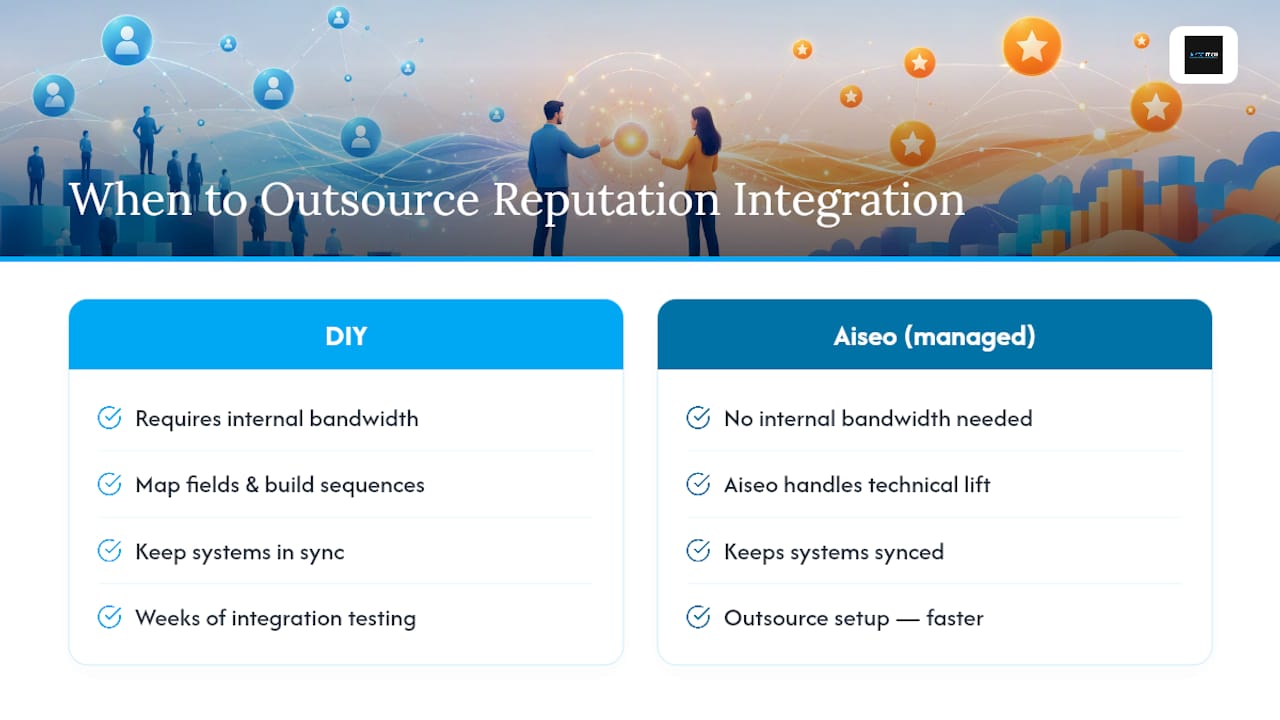
Everything above assumes you have the internal bandwidth to map fields, build nurture sequences, and keep two systems in sync. Plenty of teams don’t, and that’s exactly where a managed approach earns its keep. Aiseo handles the technical lift of connecting your reputation data into the funnel you’re already building, so your CRM and marketing automation stack gets a signal most competitors ignore entirely.
ReviewSync, Aiseo’s reputation management platform, centralizes reviews across every major platform, flags sentiment shifts automatically, and feeds that signal into how you score and nurture leads. Instead of guessing why a hot lead went cold, you can see whether a bad review cycle hit right before it happened. For teams that would rather outsource setup than spend weeks on integration testing, Aiseo’s reputation management services build that connective layer for you, from initial audit to ongoing monitoring.
If your funnel is already built but your reputation data is scattered across five review sites nobody checks weekly, visit Aiseo and request a reputation audit to see where leads are quietly leaking trust before they ever reach a sales rep.
Sources
The definitions and comparisons in this guide draw on a handful of vendor and analyst resources worth reading directly if you want more depth.
- CRM vs. Marketing Automation: Differences + How To Use (2026) – Shopify
- Marketing Automation vs CRM: Which Do You Actually Need? – Rework resources
- CRM vs Marketing Automation: Key Differences – Boomi
- Marketing Automation Software | Salesforce