10 Ready to Use Marketing Automation Workflows to Launch This Quarter

A marketing automation workflow is a predefined sequence of automated actions triggered by specific customer behaviors or conditions. It watches for a trigger, checks conditions, fires actions like emails or texts, and exits once a goal is hit. Done right, it delivers personalized messages at scale and turns campaign guesswork into measurable, repeatable revenue.
TL;DR:
- Successful workflows rely on reliable triggers, clean data, and precise timing to prevent errors and ensure messages are sent at the right moment.
- High-impact templates like abandoned cart recovery and welcome series should be prioritized, with KPIs such as revenue per recipient and activation rates guiding optimization.
- Avoid overautomation by setting clear priorities, suppression rules, and understanding that good data governance is vital for consistent performance.
- Building a disciplined process for workflow design, testing, and monitoring helps prevent common failures and maximizes ROI, which averages over five dollars returned per dollar spent.
- Outsourcing review management or using managed platforms can reduce internal complexity, especially for teams lacking resources for ongoing QA and data hygiene.
Table of Contents
- What Are Marketing Automation Workflows, and Why Do They Matter?
- What Components Does Every Workflow Need?
- Which Workflow Templates Should You Build First?
- How Do You Design and Build a Workflow Step by Step?
- How Do You Measure Workflow Performance and ROI?
- How Do You Keep Multiple Workflows From Colliding?
- Why Experience and the Right Tools Matter for Workflow Success
- Where Does Automation Pay Off Fastest, and Where Do Teams Get Burned?
- Want a Managed Path Instead of Building It Alone?
- Sources
What Are Marketing Automation Workflows, and Why Do They Matter?
Every workflow follows the same skeleton: a trigger (a signup, a cart abandonment, a support ticket closing), a set of conditions that route the contact down the right branch, one or more actions (an email, an SMS, a CRM task, an ad audience update), and an exit that fires once the goal is met. That structure sounds simple because it is. What makes it powerful is that it runs the same way for one contact or a hundred thousand, without a marketer manually pulling a list every Tuesday morning.
The business case is not theoretical anymore. Nucleus Research found that marketing automation returns an average of $5.44 for every $1 spent, with a typical payback period under six months across the case studies it reviewed. Separate Nucleus Research analysis found automation implementations increase sales productivity by 14.5% and cut marketing overhead by 12.2% on average.
Pro Tip: Treat that ROI figure as a ceiling for well-run programs, not a guarantee. The payback window shrinks fast when workflows are tied directly to revenue events and CRM data, and stretches out when teams automate before their data is clean.
Automation earns its keep in a few specific situations:
- High-volume, repeatable moments (welcome emails, cart recovery, renewal reminders) where a human sending each one manually is not realistic.
- Behavior-triggered messages that need to go out within minutes or hours, not whenever someone remembers to check a list.
- Multi-step nurture sequences where timing and sequencing matter more than a single blast.
Manual campaigns still make sense for one-off announcements, executive relationship touches, or anything requiring judgment a rules engine cannot replicate. The best programs run both: automation for volume and consistency, humans for nuance.
What Components Does Every Workflow Need?
A workflow is only as reliable as its weakest component. Skip one of these and the whole sequence either fires at the wrong time or, worse, never fires at all.
- Trigger: the event that starts the sequence. Common types include form submissions, cart abandonment, purchase completion, email link clicks, date-based events (birthdays, renewal dates), and CRM stage changes.
- Conditions: the if/then logic that routes contacts down different branches, such as “if lifetime value is above $500, send to VIP branch.”
- Actions: the actual outputs, including emails, SMS, push notifications, CRM task creation, ad audience syncs, or internal Slack alerts to sales.
- Timing: delays and wait steps between actions, calibrated to how urgent the message actually is.
- Goals and exits: the condition that pulls a contact out of the workflow, ideally tied to a measurable outcome like a purchase or a booked demo.
None of it works on messy data. Standardizing CRM fields and contact records before automating is a prerequisite, not a nice-to-have; inconsistent name formats, duplicate records, or blank lifecycle-stage fields will break personalization tokens and send a workflow down the wrong branch entirely.
| Component | Example | Failure mode if skipped |
|---|---|---|
| Trigger | Cart abandoned for 60 minutes | Workflow never starts |
| Condition | Cart value over $100 gets a bigger discount | Wrong offer sent to wrong segment |
| Action | Send reminder email, sync to retargeting ads | Message never reaches the contact |
| Timing | Wait 1 hour, then 24 hours, then 72 hours | Messages feel spammy or arrive too late |
| Goal/exit | Purchase completed | Contact keeps getting emails after buying |
Data hygiene deserves special attention because it’s invisible until it fails. A blank “first name” field renders as “Hi ,” in a live email; a duplicate contact record can trigger the same welcome series twice. Fix the data model before you build the logic on top of it.
Which Workflow Templates Should You Build First?
Start with the templates that map to the highest-value moments in the customer journey, then adapt the specifics to your product and sales cycle. Industry data consistently points to the same short list of high-impact flows: welcome series, abandoned cart recovery, post-purchase nurture, win-back, and lead scoring workflows show up in nearly every successful automation program.
E-commerce templates:
- Abandoned cart recovery. Trigger: cart abandoned for 60+ minutes. Goal: completed purchase. Actions: reminder email at 1 hour, incentive email at 24 hours, final urgency email at 72 hours. KPI: cart recovery rate and revenue per recipient.
- Post-purchase nurture. Trigger: order confirmed. Goal: repeat purchase or review submission. Actions: shipping confirmation, usage tips at day 3, review request at day 10, cross-sell offer at day 21. KPI: repeat purchase rate within 60 days.
- Replenishment. Trigger: purchase date plus average product-specific reorder cycle. Goal: reorder. Actions: reminder email with one-click reorder link, follow-up with a small discount if no action in 5 days. KPI: reorder conversion rate.
- Browse abandonment. Trigger: product page viewed twice without add-to-cart. Goal: add to cart. Actions: single follow-up email or retargeting ad showing the viewed product. KPI: click-through to product page.
B2B and lead-gen templates:
- Welcome series. Trigger: new subscriber or trial signup. Goal: activation or first meaningful product action. Actions: intro email immediately, value-proof email at day 2, case study at day 5, direct CTA at day 8. KPI: activation rate.
- Lead nurturing. Trigger: content download or webinar attendance. Goal: marketing-qualified lead status. Actions: educational content drip every 4 to 6 days based on topic interest, scoring increases with each engagement. KPI: time-to-MQL.
- Demo follow-up. Trigger: demo call completed. Goal: proposal accepted or next meeting booked. Actions: recap email within 2 hours, resource email at day 2, check-in call reminder to sales at day 5. KPI: demo-to-opportunity conversion.
- Lead scoring escalation. Trigger: score crosses a defined threshold. Goal: sales handoff. Actions: internal CRM task for a rep, direct outreach email from the assigned rep. KPI: score-to-handoff speed.
Retention templates:
- Win-back. Trigger: no purchase or login in 60 to 90 days depending on your typical cycle. Goal: reactivation. Actions: “we miss you” email, incentive at day 7 if no response, final survey email asking why they left. KPI: reactivation rate.
- VIP recognition. Trigger: lifetime value or order frequency crosses a top-tier threshold. Goal: increased loyalty and referrals. Actions: early access offers, dedicated support line, occasional handwritten-style thank-you note. KPI: retention rate among the segment.
Each template is a starting point, not a finished product. The trigger logic and timing above are reasonable defaults; your actual numbers should come from your own customer journey mapping and historical response data.
How Do You Design and Build a Workflow Step by Step?
Templates give you the blueprint. Building one that actually performs takes a disciplined process, and skipping steps is where most automation programs quietly break.
- Define one measurable objective. Every workflow should chase a single outcome, whether that’s a purchase, a booked call, or a completed profile. Mixing objectives inside one flow is the fastest way to muddy your reporting and confuse the contact.
- Choose the trigger and confirm it fires reliably. Test the trigger in isolation before building anything downstream. If it’s a CRM field change, confirm that field updates consistently and isn’t manually edited by three different teams.
- Map the full branch logic on paper or a whiteboard first. Draw every condition, every branch, every suppression rule, and every exit before you touch the automation platform. This is where most 80/20 design flaws get caught cheaply.
- Build in suppression rules up front. Decide who should never enter this workflow, existing customers in a prospect nurture, unsubscribed contacts, anyone currently in a higher-priority flow, and code that logic before launch, not after complaints roll in.
- Write and personalize content for each branch. Use dynamic fields sparingly and always with a fallback value, so a missing first name renders as “there” or “hi” instead of a blank space.
- Set timing based on urgency, not convenience. A cart abandonment email waiting 24 hours to send loses most of its recoverable revenue; a B2B nurture email sent too fast can read as robotic.
- Define the exit and goal event precisely. Tie the exit to a trackable event like an order ID or a form submission, not a vague “if they seem interested” condition.
- Run a QA pass with test contacts across every branch. Push a handful of test records through each condition path and confirm every email renders, every link works, and every timing delay behaves as expected.
- Launch to a small segment first. Send the workflow to 5 to 10% of the eligible audience for a week before turning it on for everyone, and watch for unsubscribe spikes or unexpected drop-off.
- Document the workflow and assign an owner. Record the objective, trigger, and exit logic somewhere the whole team can find it, so nobody duplicates the workflow six months later.
Pro Tip: Build your QA test contacts as a real segment inside your CRM, not a one-off spreadsheet. That way, every time you update the workflow, you can re-run the same test group instead of re-inventing your QA process from scratch.
How Do You Measure Workflow Performance and ROI?
Vanity metrics like open rate tell you almost nothing about whether a workflow is making money. Track these instead, in roughly this order of importance:
| Metric | What it tells you | Watch for |
|---|---|---|
| Conversion to goal | Whether the workflow drives its intended outcome | Low conversion despite high engagement signals a broken offer or CTA |
| Revenue per recipient | Actual dollar value generated per contact | Useful for comparing workflows of different sizes |
| Open and click rate | Whether subject lines and content resonate | Declining trend over time often signals fatigue |
| Unsubscribe rate | Whether frequency or relevance is off | A spike after a specific email points to that message |
| Time-to-conversion | How long it takes contacts to complete the goal | Longer times may justify adding a step or incentive earlier |
On the ROI side, keep your framing conservative. Nucleus Research’s benchmark of $5.44 returned per $1 spent represents an average across well-implemented case studies, not a floor every workflow will hit in month one. A more honest way to model it internally: estimate the revenue per recipient for your pilot workflow, multiply by expected volume, and subtract the platform and setup cost. That gives you a number you can defend to finance instead of borrowing someone else’s average.
Review performance on a cadence that matches the workflow’s cycle length. A cart recovery flow with a 72-hour window can be reviewed weekly; a 90-day win-back sequence needs at least a month of data before you draw conclusions. Cohort analysis, comparing contacts who entered the workflow in January against those who entered in March, catches seasonal effects and content fatigue that a single aggregate number will hide. Deeper reporting frameworks live on Aiseo’s analytics resources if your team wants to build out a more formal dashboard.
How Do You Keep Multiple Workflows From Colliding?
Automation problems rarely come from one bad workflow. They come from five decent workflows that were never designed to coexist, and a contact who ends up getting three emails in one morning.
- Follow one workflow, one objective. Practitioner guidance consistently points to this as the single biggest driver of clean automation: a workflow chasing two goals at once almost always underperforms both.
- Adopt a naming convention immediately. Something as simple as
[Channel]_[Segment]_[Goal]_[Version]saves hours of confusion once you have 20 workflows running. - Build suppression lists that cross workflows, not just within one. A contact in your win-back flow should not simultaneously be entering your standard nurture sequence.
- Set frequency caps at the contact level. Cap total marketing messages per contact per week, regardless of how many workflows technically qualify them.
- Assign explicit priority rules. If a contact qualifies for both a cart recovery flow and a nurture flow, decide in advance which one wins and code that logic.
- Version control every workflow change. Note what changed and why, so a performance dip six weeks later can be traced back to an actual edit.
Pro Tip: Run a quarterly audit where you list every active workflow, its objective, its average monthly volume, and its owner on one page. If you can’t fill in “owner,” that workflow is the first place fatigue and overlap will show up.
Data governance underpins all of it. Standardized fields, deduplicated contact records, and a clean CRM sync are what let suppression rules and personalization actually work as intended.
Why Experience and the Right Tools Matter for Workflow Success
Workflows fail less often from bad ideas and more often from execution gaps: a trigger that misfires, a data field that renders blank, a suppression rule nobody wrote down. Closing those gaps takes both hands-on experience building sequences across different industries and the right technology stack behind the scenes.
A workflow is only as trustworthy as the data feeding it and the discipline behind maintaining it. The technical build is the easy part; the ongoing governance is where most programs quietly decay.
Aiseo Tech’s work in AI-driven digital marketing, including its ReviewSync platform for multi-platform review management, reflects the same underlying principle that governs good workflows: automation only earns trust when it’s paired with clean data and consistent oversight. The AI-driven approach to SEO and marketing that Aiseo Tech applies focuses on turning organic visibility gains into measurable ROI, the same standard any automation program should be held to.
Where Does Automation Pay Off Fastest, and Where Do Teams Get Burned?
The fastest returns come from the workflows tied to a moment the customer is already leaning toward action: welcome series, cart recovery, and demo follow-up consistently outperform broader nurture sequences because the intent is already there. Build those three first, prove the ROI, then expand.
The most common failure isn’t a bad template. It’s overautomation, stacking workflow on workflow until contacts get buried and nobody owns the exits. Poor exit logic is the quiet killer: a customer who already bought but keeps getting cart recovery emails does more brand damage than a workflow that never launched.
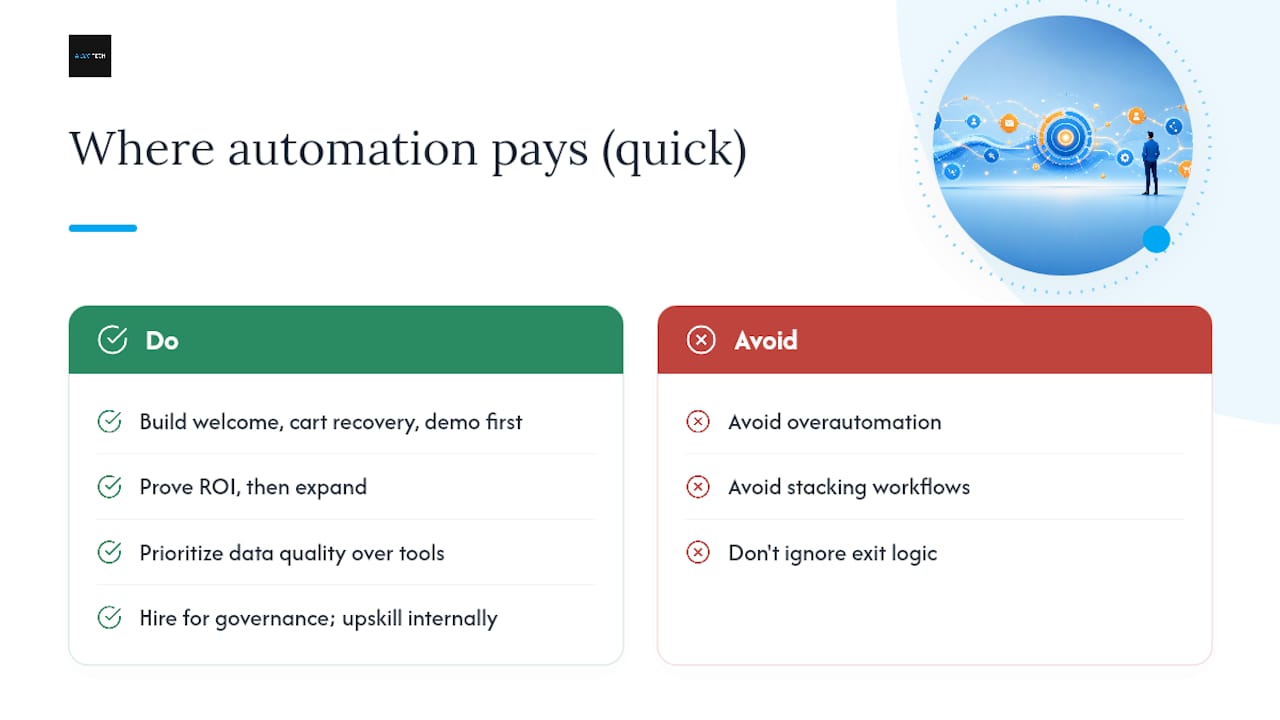
Data quality, not platform choice, decides most outcomes. A cheap tool on clean data beats an expensive one on messy fields every time.
Hire outside help when you need to build governance and QA discipline fast; upskill internally when the volume justifies a dedicated owner long-term.
— Prasad
Want a Managed Path Instead of Building It Alone?
Building and maintaining a full workflow library takes real engineering time: QA cycles, suppression logic, ongoing data hygiene. If your team would rather hand off the reputation and review side of that equation while keeping your own workflows lean, Aiseo Tech’s ReviewSync platform manages customer reviews across multiple platforms, automates sentiment analysis, and feeds cleaner signals into whatever automation stack you already run.
Teams that benefit most from a managed partner are usually short on internal QA bandwidth or juggling review management across too many platforms to track manually. If you’re weighing where AI-driven personalization fits into your broader strategy, Aiseo Tech’s approach to AI in content and campaign strategy is worth a look alongside your own workflow build. Ready to see what a managed reputation and marketing setup looks like for your business? Get started with Aiseo Tech and request a walkthrough of what ReviewSync can handle for you this quarter.
Sources
- Marketing automation returns 5.44 for every dollar spent (Nucleus Research, v61)
- Marketing Automation Workflow: Triggers, Templates, QA, and Multi-Channel Rules (Tajo blog)