48 Hour Plan to Increase Google Reviews, Compliance First by AISEO

Three actions move the needle on Google reviews faster than anything else: ask at the moment of peak satisfaction, hand customers a one-tap review link or QR code, and automate a single polite follow-up by SMS or email. Train your team to ask in person and reply to every review that comes in. Never offer money, discounts, or incentives for reviews, and never gate the ask by pre-screening happy customers only. A platform like ReviewSync can handle the automation and measurement side once the basics are in place.
TL;DR:
- Automating review requests with a direct link or QR code placed on receipts and emails significantly increases the likelihood of gaining new reviews quickly.
- Asking for reviews immediately after service completion and within 24 to 48 hours is most effective, while timing varies by business type and customer experience.
- Using automated follow-ups through SMS or email, combined with careful channel tracking, can optimize review collection without risking policy violations.
- It is strictly prohibited to offer incentives or selectively solicit only happy customers, as Google enforces policies against manipulation and gating reviews.
- Regularly monitoring review performance metrics and responding promptly helps build trust, improve local SEO, and maintain a genuine reputation.
Table of Contents
- Your 48-Hour Google Reviews Checklist
- Where and When Should You Ask Customers for Reviews?
- What Should You Automate, and What Tools Handle It?
- How Do You Track Whether Your Review Strategy Is Working?
- What Does Google Actually Prohibit When Asking for Reviews?
- Why Reputation Management Is More Than Just Review Counting
- What I’d Prioritize if I Were Starting From Zero
- How ReviewSync Turns This Playbook Into a System
- Where to Verify the Rules and Refine Your Approach
- Sources
Your 48-Hour Google Reviews Checklist
You don’t need a quarter-long strategy to start moving your review count. You need five things done correctly in the next two days.
- Build and test your one-tap review link. Generate the direct “writereview” URL from your Google Business Profile, then create a QR code version. A direct review link removes the friction of customers having to search for your business first, which is often the single biggest reason review requests fail.
- Place the link everywhere customers already look. Add it to receipts, thank-you pages, and every team member’s email signature.
- Write one script and train one employee to use it. A brief, well-phrased in-person ask at the moment of satisfaction is more effective than an awkward improvised request.
- Set up a single automated follow-up. One SMS or email sent 24 to 48 hours after service, no more.
- Block a short weekly period for review monitoring. Check what’s new, flag anything urgent, and draft responses.
Where and When Should You Ask Customers for Reviews?
Timing beats wording almost every time. Ask too early and the customer hasn’t formed an opinion yet. Ask too late and the moment of satisfaction has faded into the background noise of their week.
Best timing by business type:
- Service businesses (repair, cleaning, consulting): ask immediately after the job is confirmed complete, while the relief or satisfaction is still fresh.
- Retail and e-commerce: ask after delivery confirmation, not after checkout, since the product experience is what customers actually review.
- Subscription or recurring services: ask around renewal points, when the customer has just re-confirmed their trust in you.
Recency matters beyond just conversion. Recent, quality reviews carry more weight in local search prominence than a pile of old ones, so a steady cadence beats one big push.
Channel-specific tactics:
- In person: hand over a printed QR code or pull up the link on a tablet right at checkout or job completion. Say something like, “If you had a good experience, a quick Google review helps us out a lot. Here’s a direct link.”
- SMS: keep it concise and clear. Example: “Thanks for choosing us today! Mind leaving a quick review? [link]” Send within the 24 to 48 hour window while the experience is still top of mind.
- Email: subject lines like “How did we do?” or “Got 30 seconds for us?” outperform generic asks. Keep the body to two sentences plus the link.
- Website: put a visible review CTA in your footer, build a dedicated “Leave a Review” page, and repeat the ask on your thank-you page after checkout.
Short, simple requests with a direct link consistently outperform long-winded asks that explain too much.
Pro Tip: Run a simple A/B test: send half your customers a friendly, warm-toned message and the other half a short, no-frills ask. Track which one gets more clicks on the link over two to three weeks before committing to one style.

What Should You Automate, and What Tools Handle It?
Automation should handle repetition, not judgment. The goal is to remove manual follow-up work while keeping every message compliant and personal enough to feel real.
What to automate:
- Sending the review link automatically once delivery or service completion is confirmed in your system.
- Scheduling exactly one reminder, never a chain of nagging follow-ups.
- Centralizing incoming reviews from Google and other platforms into a single inbox so nothing slips past a response.
- Tracking which channel, receipt, SMS, or email, actually drives clicks using short branded links or UTM tags, since trackable links reveal which placement earns you reviews versus which one is just noise.
Tool categories worth considering:
- Short-link and QR generators for receipts and signage.
- SMS and email automation platforms tied to your CRM triggers.
- Reputation management platforms that combine both, such as ReviewSync, which aggregates requests, responses, and sentiment tracking in one place.
Whatever you automate, build in policy guardrails: no template should ask for a specific star rating, and reminder frequency should be capped so customers aren’t asked twice for the same transaction. A workflow tool built for streamlined sales automation can help you decide exactly where in the customer journey the trigger should fire.
How Do You Track Whether Your Review Strategy Is Working?
Five numbers tell you almost everything: new reviews per month, average star rating, the percentage of your reviews posted in the last 90 days, average response time, and conversion rate by channel.
Check for new reviews and reply opportunities daily. Review the trend weekly. Once a month, look at the bigger picture, are certain channels underperforming, is your average rating drifting?
- Personalize every reply and reference specific details from the customer’s visit or order.
- For negative reviews, acknowledge the issue directly and move resolution offline when it requires more than a public apology.
- Tag recurring themes in reviews (slow response, pricing confusion, standout staff) and route them back to operations.
- Pull strong, specific language from positive reviews into your marketing copy.
Responding consistently isn’t just good service. It’s a measurable local SEO signal that search engines and prospective customers both notice.
What Does Google Actually Prohibit When Asking for Reviews?
Google’s rules are narrower than most business owners assume, but breaking them carries real consequences.
- No incentives, ever. Google’s policy on fake or misleading content explicitly forbids money, discounts, free products, or any reward tied to leaving a review. Violations can mean review removal or profile suspension.
- No gating. Inviting only your happiest customers while quietly skipping unhappy ones is a form of manipulation Google treats seriously, even without a formal FTC finding. The FTC’s own guidance on soliciting reviews reinforces the same principle: solicit honestly or don’t solicit at all.
- No scripted wording or star counts. Ask for honest feedback, not a five-star review specifically.
- Report fake reviews through your Business Profile’s review flagging tool, and escalate to Google support if a competitor or bad actor is clearly gaming your listing.
Google’s own guidance backs this up directly: the official tips page recommends reminding customers, sharing a review link, replying to feedback, and treating a mix of positive and negative reviews as a sign of authenticity, not a problem to hide.
Why Reputation Management Is More Than Just Review Counting
Aiseo built its reputation practice around a simple premise: reviews are a marketing asset, not just a defensive metric. AISEO Tech specializes in AI-driven reputation management, SEO, and online advertising, and its integration of AI into day-to-day marketing decisions is what separates data-driven strategy from guesswork.
ReviewSync, the company’s flagship product, was built specifically to help businesses manage reviews across multiple platforms at once, not just Google, while improving overall brand trust and visibility. Aiseo applies the same AI-driven approach across its broader marketing work, using it to sharpen organic search visibility, track marketing effectiveness, and improve customer engagement and ROI for the businesses it works with.
What I’d Prioritize if I Were Starting From Zero
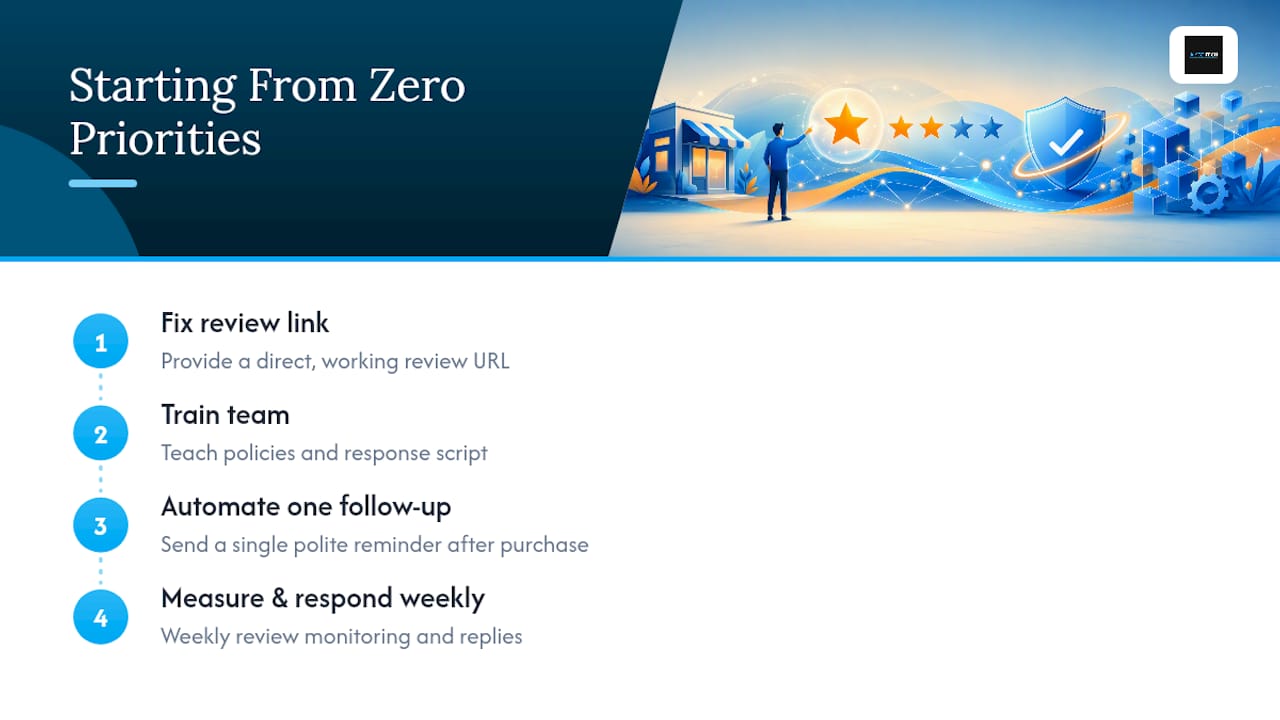
If you’re overwhelmed by all the moving pieces, here’s the order I’d tackle them in: fix your review link first, train your team second, automate one follow-up third, then build the habit of measuring and responding weekly. Everything else is optimization.
The mistakes I see most often aren’t complicated. Businesses offer a discount for a review without realizing it violates policy. They send three reminders instead of one and irritate customers who already left feedback elsewhere. Or they collect reviews and never reply, which wastes the trust signal entirely. Pick one priority this week: probably fixing your link or writing your first reply script. Momentum compounds faster than perfection does.
— Prasad
How ReviewSync Turns This Playbook Into a System
Everything above works manually, but it scales far better with the right infrastructure behind it. ReviewSync is built specifically to run this playbook without risking Google’s policies: automated review requests go out on a fixed schedule, never repeated endlessly, and messaging templates never ask for specific star ratings or offer anything in exchange for a review.
The platform pulls reviews from Google and other platforms into one dashboard, applies sentiment analysis to flag what needs urgent attention, and gives your team response templates that still sound personal. You also get channel tracking baked in, so you can see whether your receipts, SMS follow-ups, or email signatures are actually driving the reviews you’re counting. For a full picture of how this fits into a broader reputation program, Aiseo’s reputation management resource walks through the strategy end to end. If you’re ready to see the automation running on your own review data, request a walkthrough of ReviewSync and get your link, templates, and tracking set up this week.
Where to Verify the Rules and Refine Your Approach
Start with Google’s own policy on fake content and tips for getting more reviews. For profile accuracy that supports review visibility, see this local business profile guide. Aiseo’s reputation management blog covers deeper tactics.
Sources
- Free Google Review Link Generator, Direct Review URLs | Flyn
- Google Reviews: How to Get More for Your Business (Shopify)